How to Generate an Investor Deck from a Chat in 90 Seconds
Turn a research chat into a slide-ready investor presentation — thesis, financials, comparables, risks. One prompt, one PPTX, every slide editable.
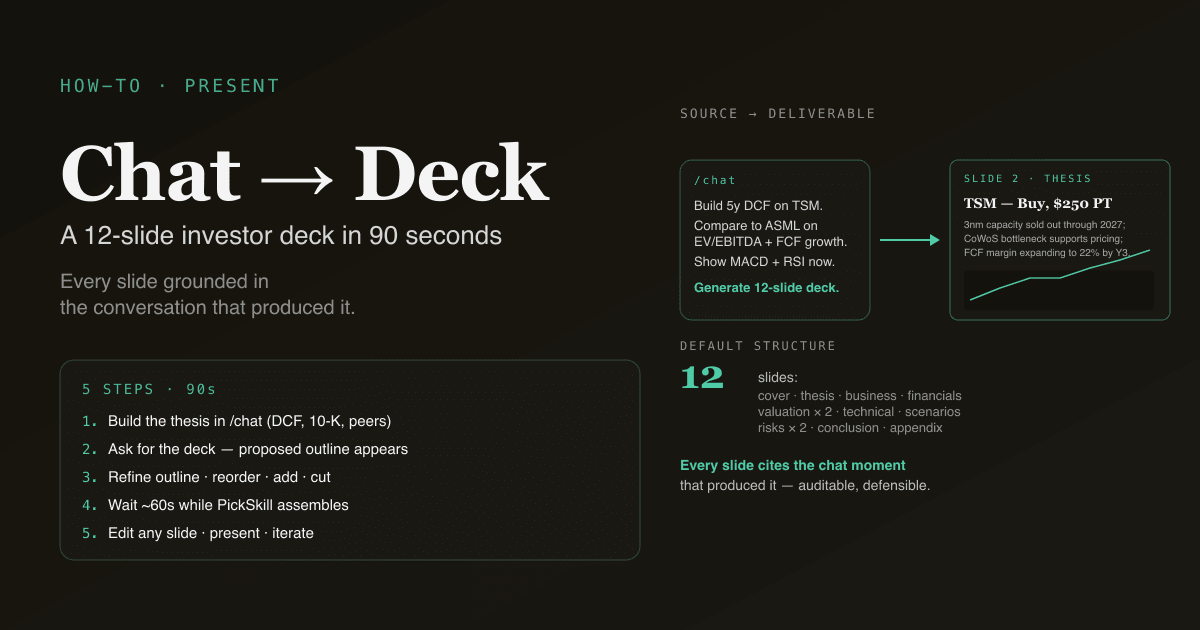
An investor deck distils a research thesis into 10–15 slides that another investor can read in 5 minutes and form an opinion on. The slides need a clear thesis statement, a few well-chosen charts, a valuation summary, and an honest risk section. This tutorial walks through generating that deck directly from a PickSkill research conversation — every slide grounded in the work you already did in the chat, every chart sourced, the .pptx ready to download in 90 seconds.
This is a 5-step tutorial. The longest step is the one where you make the actual investment-judgement call. Everything else is mechanical.
Key takeaways
- 5 steps, ~90 seconds. Open a chat, build the thesis, ask for the deck, edit the prompt, download.
- The deck is generated from the chat history — every chart in the deck cites the moment in the conversation where it was discussed.
- 10–15 slides by default. Cover, thesis, business overview, financials, valuation, technical setup, comparables, scenarios, risks, appendix.
- The output is a real
.pptxfile — edit any slide, present from PowerPoint or Keynote, share without conversion. - Works across US, HK, and A-share names. The deck adapts disclosure conventions per market.
Why this matters
The investor deck format exists for a reason: it forces the analyst to articulate the thesis in a structure that exposes weak links. A 15-page memo lets you hide the gap between "I like this stock" and "here is why someone else should care." A 12-slide deck makes those gaps visible immediately — and the discipline of producing one improves the underlying analysis even if you never show the deck to anyone.
Three audiences benefit:
- A potential investor or partner. The deck is the most efficient way to share a thesis for second opinion.
- A formal investment committee. Many investment clubs, family offices, and student funds require deck-format presentations for new positions.
- Your own analytical discipline. Writing the deck is the test; sharing it is optional. If a thesis can't be deck-ified cleanly, the thesis usually has hidden gaps worth addressing.
The 5-step workflow
Step 1 — Open a chat and build the thesis
Go to /chat and walk through your research. A typical thesis-building conversation looks like:
Build a 5-year DCF on TSMC. Show me the WACC sensitivity.
What does the 10-K tell me about gross margin trajectory?
Compare against ASML and Lam Research on EV/EBITDA and FCF growth.
What does the technical setup look like right now — MACD, RSI, MA stack?
The exact prompts don't matter as much as the coverage. By the end of the conversation, you should have:
- A valuation read (DCF, comparables, or both)
- A business / fundamental view (margin trajectory, growth drivers, balance sheet)
- A competitive position (versus 2–3 closest peers)
- A technical context (current trend regime, momentum, key levels)
If you haven't built the foundation, see Build a DCF in 60 Seconds, Summarise a 10-K in 60 Seconds, and Track a Portfolio with Indicators for the upstream conversations.
Step 2 — Ask for the deck
Once you have the thesis built, ask PickSkill to generate the deck:
Generate a 12-slide investor deck from this conversation.
Lead with the thesis in one sentence. Then business overview, financials,
valuation (both DCF and comparables), technical setup, scenarios (bull/base/bear),
risks, and an appendix. Make every slide presentation-ready.
That's the whole input. PickSkill uses the conversation history as the deck's source material — every chart, table, and bullet traces back to a specific exchange in the chat.
Step 3 — Refine the structure before generation
Before PickSkill commits to generating, you'll see a proposed slide outline. Common edits at this stage:
- Reorder slides — "move the technical setup to slide 4, before financials" if you're presenting to a trader audience.
- Cut slides — "skip the comparables slide; my audience doesn't care about relative valuation."
- Add slides — "add a slide on management quality and capital allocation track record."
- Adjust depth — "expand the risk section to 2 slides — first slide for fundamental risks, second for technical / market structure risks."
The outline-then-generate pattern saves a regeneration cycle. The full deck takes 30–60 seconds to assemble; an iteration on the outline takes 5 seconds.
Step 4 — Wait while PickSkill assembles the deck
PickSkill does, in order:
- Compiles the chat history relevant to the deck (filters out side-conversation, exploratory dead-ends).
- Pulls the latest data for every metric referenced — prices, financials, multiples.
- Renders the charts (price + technical, valuation comp, scenario fan) as embedded images.
- Generates the slide content with the investor-deck-standard conventions: thesis statement on slide 2, valuation framework explicit, risks pre-mortem rather than buried.
- Composes the
.pptxwith formatted titles, footnotes citing sources, and a final appendix with data provenance.
You'll see a streaming summary. When complete, you get a download link valid for 7 days.
Step 5 — Edit any slide, present, iterate
The downloaded .pptx opens in PowerPoint, Keynote, or Google Slides. Every slide is fully editable.
For deck-level edits, return to the chat:
Re-do slide 8 (scenarios). Make the bull case more aggressive — push the year-3
revenue growth assumption to 25% instead of 15%. Show me the new DCF output.
Add a slide between 5 and 6 with the historical EV/EBITDA range over the last
5 years and where the current multiple sits.
Make a 5-minute version of this deck — keep only the cover, thesis, valuation
summary, and risks. Cut everything else.
PickSkill re-generates with the new structure.
Try it now. Open a chat, walk through a thesis, and ask for the deck. The whole loop is under 2 minutes.
What the output looks like
The default 12-slide structure:
| Slide | Content |
|---|---|
| 1. Cover | Ticker, company name, presenter, date, one-sentence headline |
| 2. Thesis | The thesis in ≤30 words, the price-target / view in one sentence, the time horizon |
| 3. Business overview | Revenue split (segments / geographies), competitive position, recent strategic moves |
| 4. Financials | Last 4 quarters of revenue, EBIT margin, FCF, key trend callouts |
| 5. Valuation — absolute | DCF summary with key assumptions, implied price, sensitivity grid |
| 6. Valuation — relative | EV/EBITDA, P/E, P/B vs sector / peers; current vs historical range |
| 7. Technical setup | Price chart with MA stack, current MACD / RSI state, key support / resistance levels |
| 8. Scenarios | Bull / base / bear cases — each with explicit assumption changes and resulting price target |
| 9. Risks — fundamental | Top 3 fundamental risks (margin compression, competition, regulation, execution) |
| 10. Risks — market | Technical risks (overbought, divergence, key level breaks), liquidity, factor exposure |
| 11. Conclusion | The action — buy, hold, watch, avoid — with size guidance and entry-level discipline |
| 12. Appendix | Data sources, methodology notes, disclaimer |
The slides use a consistent typographic system and brand-aligned colour palette designed for legibility in a meeting setting (≥18pt body text, high-contrast charts).
What you can't do in 90 seconds
Honest caveats:
- Original primary research. The deck is built from PickSkill's data sources and the work in your chat. If your thesis depends on a primary-research interview (a channel check with a customer, a conversation with a former employee), that content needs manual addition.
- Heavily custom valuation models. A standard DCF, a relative valuation, or a sum-of-the-parts framework works out of the box. A real-options model on a biotech pipeline, or a regulated-utility DCF with rate-base mechanics, requires more custom conversation upstream.
- Compliance-grade legal disclosure. The appendix includes a basic disclaimer. If you are using the deck in a regulated context (registered advisor, fund manager), the compliance language needs review by counsel — PickSkill is not legal advice.
Common follow-up prompts
- "Make a one-pager version of this deck — single slide, executive summary format."
- "Generate the same deck for the closest competitor, side-by-side comparison."
- "Translate the deck to Mandarin / Japanese / German for a non-English audience."
- "Convert the technical setup slide to a multi-timeframe view — daily, weekly, monthly charts."
- "Add a 'questions I expect from the audience' slide at the end with prepared answers."
FAQ
How is this different from the portfolio-export PPT? The portfolio export generates a deck from the data — holdings, indicators, valuation snapshots, all rendered in a standard structure. This tutorial generates a deck from a thesis conversation — slide content is shaped by what you actually researched and argued, not by a fixed template. Use the portfolio export for periodic position reviews; use the chat-to-deck flow for new-position pitches.
Does the deck cite specific moments in the chat? Yes — appendix footnotes and chart captions reference the prompt-and-response moments where the content originated. This makes it easy to retrace the analytical chain when defending a slide, and it makes the deck auditable for anyone reviewing your work.
Can I generate the deck in another language? Yes — add "in [language]" to the prompt at step 2. PickSkill supports the 8 locales used across the platform. Charts, slide titles, body text, and footnotes all translate; data values and ticker symbols remain in their native form.
What if my thesis depends on something not in the conversation? Add it before generating: "Note that I have separately confirmed via primary research that customer Y is migrating to product Z by end of Q3." PickSkill includes the addition as an attributed bullet in the relevant slide. Anything not in the conversation is not in the deck by design — the deck is grounded in the chat.
How does this compare to using ChatGPT or Claude directly to write a deck? The difference is in the grounding. PickSkill's chat already pulled the live filings, computed the DCF, ran the indicators, and pulled comparables. The deck composition is based on those sourced primitives, not on the model's general knowledge. The result is materially less prone to fabricated numbers or stale data, which is the failure mode of generic chatbot-driven deck generation.
Can I save the deck and come back to update it later? Yes — the chat session persists. Re-open the conversation and ask "regenerate the deck with today's data and add a slide for the new earnings release" — PickSkill rebuilds the deck with the new context layered onto the original thesis.