How to Share a Portfolio via Link (and Why You Should)
PickSkill portfolios can be shared as a single URL — live indicator dashboards, latest signals, valuation snapshots — with no account required. 3 steps and 30 seconds.
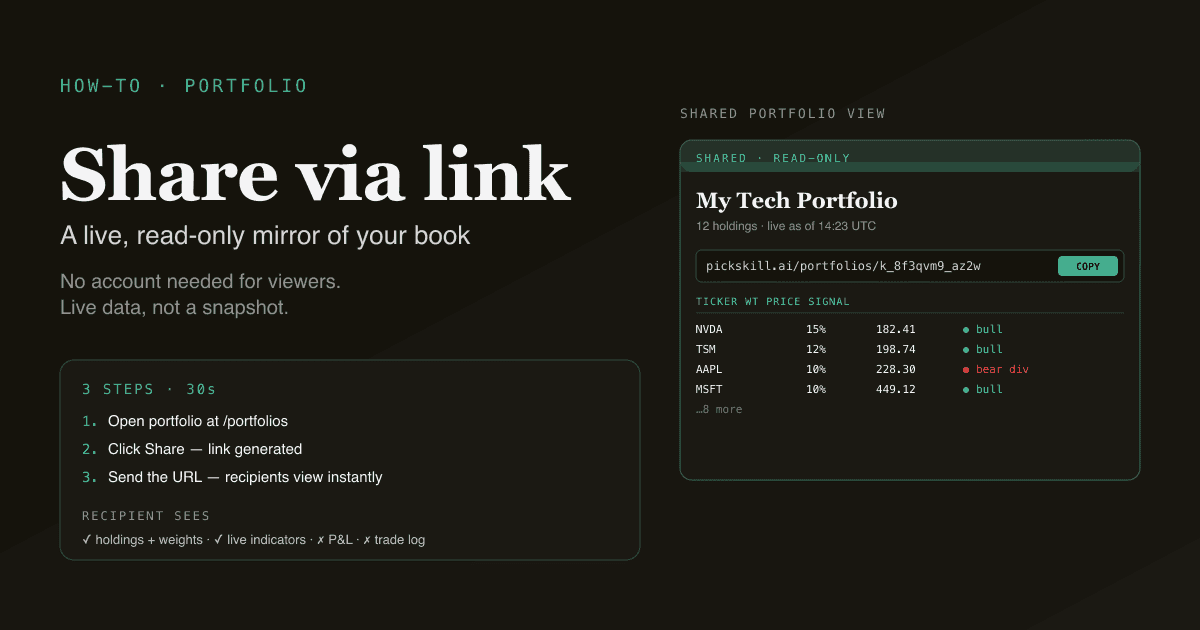
A PickSkill portfolio can be shared as a single URL — anyone with the link sees a live view of your holdings, the latest indicator dashboards, and the signal trail across every dimension. They don't need a PickSkill account. They don't need to set anything up. The link is read-only by design, so your portfolio composition is visible but not editable. This tutorial walks through the share flow in 3 steps and explains why making your portfolio shareable is one of the highest-leverage habits you can build.
Key takeaways
- 3 steps, ~30 seconds. Open the portfolio, click share, copy the link.
- The shared view is read-only. Recipients can see, sort, and inspect — they cannot edit your holdings or change your allocation.
- Live data, not a snapshot. The shared link refreshes against current market data every time it's opened.
- No account required for viewers. The link works for anyone — no sign-in barrier, no email collection.
- The shared view shows the same indicator dashboards as your private view — same charts, same 5-day signal trail, same multi-indicator overlay.
Why share a portfolio?
Three reasons that compound over time.
1. Pressure-test your thinking
Private portfolios are private failures. When nobody else sees your holdings, you build subtle blind spots — over-weighting names you have an emotional attachment to, ignoring divergence signals that don't fit your thesis, anchoring on entry prices long after the thesis has changed.
Sharing the portfolio with even one other investor — a friend, an investment club partner, a family member — forces you to articulate what you own and why. The articulation itself catches problems before they cost you.
2. Build a track record visibly
The most underrated thing a new investor can do is keep an open journal of decisions. Aspiring analysts who want to be taken seriously professionally need a track record. Aspiring fund managers raising friends-and-family capital need transparency. Aspiring writers or content creators need shareable work.
A live PickSkill portfolio link with 12 months of decision history is a real artefact. It works as an interview prop, a credibility signal, a substrate for blog posts and Twitter threads, and a portfolio review tool with your own future self.
3. Make collaboration cheap
Investment clubs, family offices, partner-share-of-account discussions — all of these traditionally happen over Excel files passed back and forth, with version drift and stale data within days. A live shareable link replaces the Excel exchange with a real-time view. The other party sees the same data you see; the conversation stays anchored on the actual state of the book, not on a snapshot from last Tuesday.
The 3-step workflow
Step 1 — Open the portfolio you want to share
Go to /portfolios and pick the portfolio you want to share. If you don't have one set up, follow Track a Portfolio with Indicators — adding 3–10 holdings takes a couple of minutes.
The same flow works for any portfolio size. A 3-name watchlist works as well as a 30-name diversified book.
Step 2 — Click "Share"
The portfolio detail page has a share button in the header. Click it. PickSkill generates a unique share URL scoped to that portfolio.
The URL looks like https://pickskill.ai/portfolios/<id> — it includes a stable identifier for the portfolio so the link doesn't rotate or expire. The URL is unguessable in practice (the identifier is a large random string), so it functions as a "share with whoever you give it to" capability — not "publicly indexed."
Two share-control options:
- Copy URL — paste anywhere. Email, Slack, X / Twitter, LinkedIn, a blog post.
- Disable sharing — revoke the link. Anyone who tries to access the URL after revoke gets a 403.
Step 3 — Send the link
Whoever opens the link sees:
- Your portfolio's name and description
- The current holdings list with weights, prices, and recent performance
- The full /indicators dashboard — every chart, every signal bucket, every 5-day trail
- The same multi-indicator overlay you see in your private view
- A live "as of" timestamp showing the data is current
Recipients do not see:
- Your account email or any other personal details
- Any other portfolios you have
- Your historical trade log or position sizes (only current weights)
- Any chat-conversation history tied to the portfolio
Try it now. Go to /portfolios, open any portfolio, and click Share. Copy the link and open it in an incognito window to see exactly what your recipient will see.
What the recipient experience looks like
The shared view is the same UI you use, with three differences:
- A banner at the top identifies the view as a shared portfolio (so recipients know they're seeing someone else's book, not their own).
- The edit / add / remove controls are hidden. Recipients can see and sort; they cannot modify your holdings.
- The "Export to chat" buttons are also hidden — sharing the portfolio doesn't share access to your chat sessions or your account's export quota.
Recipients can:
- Sort the holdings table by weight, price, change, or signal bucket
- Click into individual holdings for the per-name indicator detail
- Toggle the 5-day signal trail view
- See divergence flags, golden / death cross alerts, support / resistance levels
- Refresh the page to see the latest data (the view updates against live market feeds)
The recipient experience is intentionally a read-only mirror of the owner's experience — same data quality, no feature degradation.
Three use cases worth building habits around
Use case 1: weekly review with a partner
Some investment clubs and partner-share-of-account arrangements use the shared link as the substrate for a weekly conversation. The flow:
- Each member shares their portfolio link with the group.
- Once a week, the group meets (in person or video) with all members' links open.
- Discussion focuses on what changed, what signals are active, and what positions to re-evaluate.
The shared link removes the Excel-and-screenshot friction that often derails these conversations. Everyone is looking at the same live state of each book.
Use case 2: track record signal for content creators
Investors who publish blogs, newsletters, or thread content benefit from a live shareable record of decisions. Linking to "my portfolio (live, real positions)" at the bottom of a piece is a credibility signal that no PDF can match — the audience can verify your thesis is reflected in actual positions and not just words.
The link does not show position sizes, only weights, which mostly addresses the privacy / safety concerns of publishing actual position sizes.
Use case 3: interview prep for aspiring analysts
Aspiring analysts interviewing for buy-side or sell-side roles need a portfolio to talk about. A live, indicator-rich portfolio link is materially more credible than a static PDF of stock picks. Interview committees can open the link on their own time, dig into the rationale, and ask sharper questions when they meet.
A few specific tips for this use case:
- Keep the portfolio focused — 5–8 high-conviction names is more impressive than 25 scattered ones.
- Make sure the descriptions on each holding capture the thesis briefly.
- Refresh the portfolio at least monthly so the link is never showing stale composition.
What you can't share (yet)
Honest scope:
- Position-level P&L is not visible in the shared view, only current weights. If you want to share P&L, export to Excel and share that file separately.
- Chat conversations tied to the portfolio do not propagate to the share. The chat history is private to your account.
- Custom annotations / personal notes on the holdings are not in the shared view. The recipient sees clean public data.
- Historical share state — there is no time-travel view of "what the portfolio looked like three months ago" via the share link. The link always reflects current composition.
These are deliberate. The shared view is a focused, read-only mirror — not a full data dump. If the recipient needs more, generate a dedicated Excel workbook or PowerPoint deck for them.
How to revoke or rotate a share link
Two situations where you might want to:
- Revoke — you no longer want a specific recipient to see the portfolio. Click "Disable sharing" in the same share dialog. The link becomes a 403; the recipient cannot regain access.
- Rotate — you want the same portfolio shareable but at a new URL (e.g., the old one was leaked or you want to send a fresh link). Disable, then re-enable — a new identifier is generated.
The control sits in the share dialog itself. There is no separate "manage shared links" surface for now — each portfolio's share state is managed inline with the portfolio.
FAQ
Does the recipient need a PickSkill account? No. The link works for anyone with the URL. The recipient does not sign in, does not provide an email, and is not tracked beyond the standard analytics.
Is the URL public — can someone Google it? The URL is unguessable (a large random identifier) and is not indexed by search engines. Practically, it is private to the people you share it with. Treat it like a Google Doc share link: it is private as long as the link is.
Can the recipient share the URL further? Yes — the URL itself is just a string. Anyone with the URL can pass it along. If you want to limit further sharing, you have to coordinate that out-of-band. To revoke access from everyone, use "Disable sharing" — that invalidates the URL for all holders simultaneously.
Does the shared view show my historical trades? No. The shared view shows current weights and live indicator dashboards only. If you want to share historical trades, export an Excel workbook and share that.
Can I share a single holding instead of the whole portfolio? Not directly — share scope is the portfolio. As a workaround, create a sub-portfolio with just the holding you want to share, then share that. Sub-portfolios are full portfolios; the management overhead is small.
What if I want to share only with a specific email address? Not currently supported — share is per-link, not per-recipient. For tighter access control, generate the link, share it with the intended recipient via a private channel, and revoke it when no longer needed. Per-email access control is on the roadmap.