Why Our AI Analyst Writes Word, PowerPoint, and Excel
Chat answers don't ship. We taught PickSkill to generate native Word, PPT, and Excel files so research becomes a deliverable you can send and present.
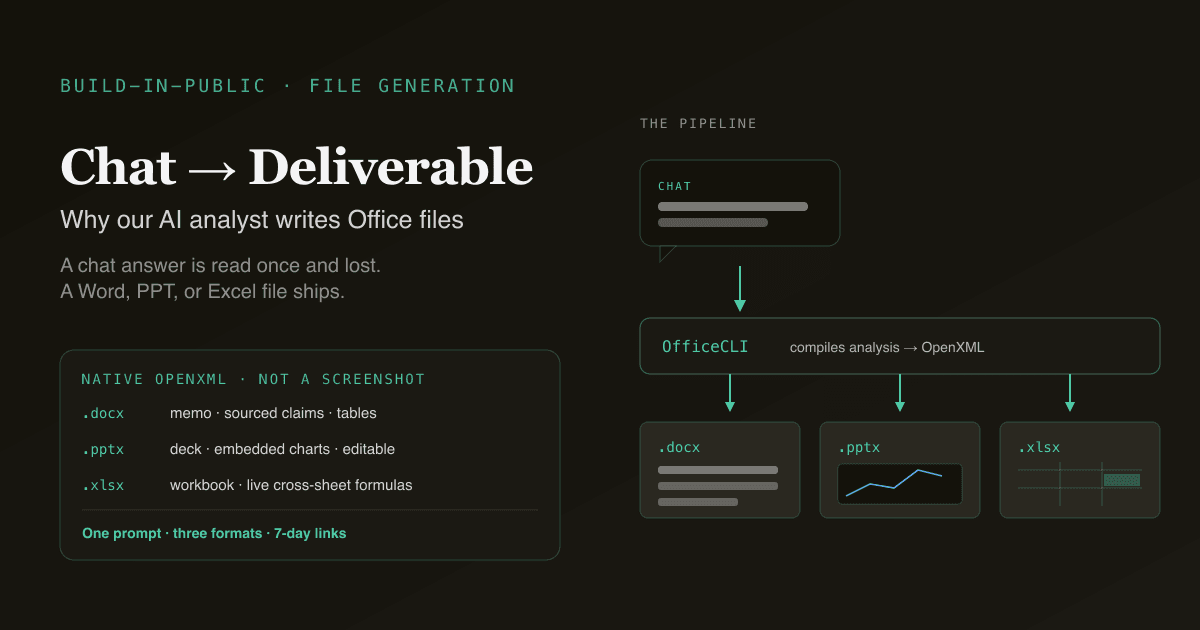
A chat answer is read once and lost; a Word memo, a PowerPoint deck, and an Excel workbook get forwarded, edited, presented, and filed. When we built PickSkill on top of the open-source Dexter agent, the single capability the underlying CLI didn't have — and the one our earliest users asked for most — was deliverables. So we added OfficeCLI: a layer that turns the agent's analysis into native .docx, .pptx, and .xlsx files. Not screenshots, not PDFs, not Markdown dumps. This post is the build-in-public case for why a serious AI analyst has to write Office files, and how we did it.
Key takeaways
- Chat output doesn't ship. The format that gets shared, edited, and presented in finance is Word, PowerPoint, and Excel — not a chat transcript.
- PickSkill generates native OpenXML files via OfficeCLI: real
.docxmemos,.pptxdecks with embedded charts, and.xlsxworkbooks with live cross-sheet formulas. - Every file is sourced from live data — indicators computed on the latest close, financials from the most recent filing, valuation from current consensus.
- Files ship as 7-day presigned links on Cloudflare R2, so there's nothing to install and no platform lock-in.
- One prompt, three formats. The same research can become a memo, a deck, or a model — you pick the artefact for the audience.
Why a chat answer isn't a deliverable
Generative AI made research answers cheap. It did not make research artefacts cheap. There's a gap between "the model told me NVDA's FCF margin is 18%" and "I have a four-page memo my investment club can read on Sunday." That gap — the presentation layer — is where most retail analysis quietly dies, because by the time you've built the analysis you want to share, you've run out of patience to assemble the deck or workbook that makes it shareable.
The formats matter because the audiences differ. A memo is for someone who reads prose and wants the argument. A deck is for a live conversation where you walk through the thesis. A workbook is for the collaborator who wants to sort, pivot, and add their own columns. A chat transcript serves none of those three — it can't be sorted, it can't be presented, and it reads like a log. Closing the gap between answer and artefact is the entire reason OfficeCLI exists.
What "native OpenXML" actually means
When we say PickSkill generates real Office files, we mean every shape, cell, formula, and chart is a genuine OpenXML object — the same file format Microsoft Office writes. The distinction is not cosmetic. A screenshot of a table is dead pixels; a real .xlsx table sorts, filters, and feeds a pivot. A PDF of slides can't be re-themed; a real .pptx deck takes your corporate template via Design → Variants and lets you edit any slide title.
Here's what each format carries:
| Format | What PickSkill writes | What you can do with it |
|---|---|---|
.docx | Headed sections, tables, sourced claims, prose narrative | Edit in Word/Google Docs, forward as a memo, paste into a report |
.pptx | Cover, holdings/thesis slides, embedded chart images, editable titles | Present from PowerPoint/Keynote, re-theme, edit any slide |
.xlsx | Multi-sheet workbook, live cross-sheet formulas, conditional formatting, sparklines | Sort, pivot, add columns, build your own model on top |
Because the output is standard OpenXML, it opens in Excel, Google Sheets, LibreOffice, Apple Numbers, Keynote, and Google Slides — no PickSkill account needed to open a file someone shared with you.
How OfficeCLI fits the agent loop
PickSkill inherits Dexter's plan-execute-validate agent loop (see From Dexter to PickSkill for the full origin story). File generation slots in as the final stage of that loop: once the agent has researched, computed, and validated, OfficeCLI compiles the result into a document.
The sequence, for a portfolio deck, runs like this:
- The agent pulls current price and price history for every holding.
- It runs the eight-dimension indicator suite (/indicators) and detects active signals.
- It pulls valuation multiples and the most recent financial summary.
- It renders indicator charts as high-resolution images.
- OfficeCLI composes the
.pptx— embedding the charts, formatting the tables, binding editable titles to the analysis. - The file is written to Cloudflare R2 and returned as a 7-day presigned download link.
The key design choice: the file is bound to the analysis, not pasted from it. Ask for a change in the chat — "lead with the FCF narrative", "compress per-holding slides to one each" — and the agent re-runs the relevant analysis and emits a fresh file. The document is downstream of the reasoning, so it stays honest.
Try it now. Open any portfolio at /portfolios and click Export to PowerPoint or Export to Excel — the file is ready in about a minute.
Three formats, three audiences
The reason we built all three rather than picking one is that retail and semi-pro analysts present to different rooms, and the artefact has to match the room:
- Word for the analyst who thinks in prose — a thesis memo, a 10-K summary, a position rationale. Read our investor-deck-from-chat walk-through for the prose-vs-slides trade-off.
- PowerPoint for the live presentation — an investment club, an interview committee, a partner who handles the family book. See export a portfolio to PowerPoint.
- Excel for the collaborator who wants to work the numbers — sort by signal strength, pivot by sector, layer their own scenarios. See export a portfolio report to Excel.
One research conversation, three possible artefacts. You choose the format when you choose the audience — the analysis underneath is identical.
The honest caveats
Build-in-public means flagging what file generation doesn't do:
- It's a snapshot, not a live link. The workbook's formulas update against its own cells, but they don't live-fetch new market data. To refresh, re-export — about 30 seconds.
- Custom corporate templates need manual setup. The deck uses PickSkill's design system; heavily branded templates (custom fonts, logo placement) apply post-export via your Office theme.
- No VBA / macros. The output is data, formulas, and charts. Macros and custom ribbons remain manual additions.
- No direct brokerage sync. Holdings come from the portfolio you maintain in /portfolios, not a live brokerage feed.
These are deliberate boundaries, not bugs — the file is a clean, sourced starting point you build on, not a black box you have to trust blindly.
FAQ
Why does an AI analyst need to write Office files at all? Because research only creates value when it's shared, and finance shares in Word, PowerPoint, and Excel. A chat answer can't be presented, sorted, or filed. Generating native Office files closes the gap between "the model answered my question" and "I have a deliverable my colleague or club can actually use."
Are the files real Office documents or just exports of a screenshot? Real OpenXML documents. Every cell, formula, slide, and chart is a genuine Office object — the workbook sorts and pivots, the deck re-themes and edits, the memo opens in Word or Google Docs. Nothing is a flat screenshot or a read-only PDF.
Do I need Microsoft Office installed to use them? No. The files open in Excel, Google Sheets, LibreOffice, Apple Numbers, Keynote, and Google Slides. Because PickSkill writes standard OpenXML and avoids vendor-specific functions in the default export, the files render correctly across every major Office-compatible suite.
How long do the download links last? Each file ships as a 7-day presigned link on Cloudflare R2. The file itself is permanent once downloaded — re-generate from the chat anytime you need a refreshed version with the latest data. The link is scoped to your account.
Can one research conversation produce more than one format?
Yes. The same analysis can become a .docx memo, a .pptx deck, or a .xlsx workbook — you choose the artefact for the audience. The underlying research is identical; only the deliverable changes, because the file is generated downstream of the agent's reasoning rather than pasted into a fixed template.