
Discovery
Find the setups, not just the tickers.
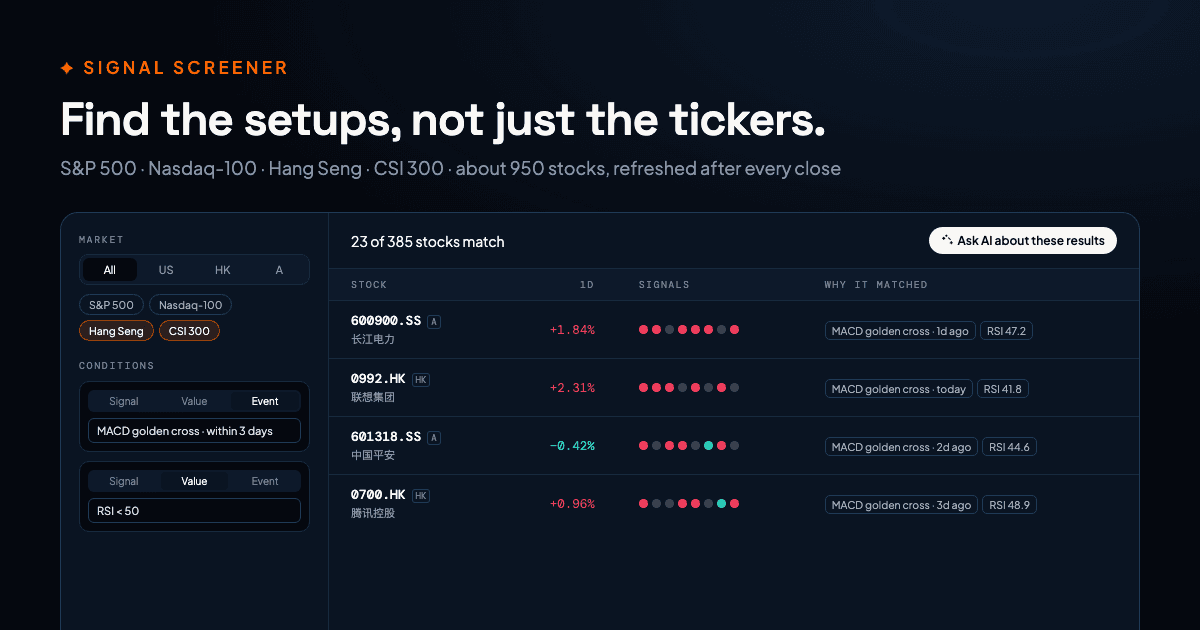
Screen about 950 stocks across the S&P 500, Nasdaq-100, Hang Seng and CSI 300 by technical signals — in a few clicks.
What it does
About 950 stocks, three markets
Every member of the S&P 500, Nasdaq-100, Hang Seng Index and CSI 300, plus any stock with a PickSkill page. Narrow to one market or one index with a tap.
Quick screens
Oversold RSI, fresh MACD golden crosses, moving averages bullish with money flowing in, KDJ turning up — one click runs the classic setups.
Build your own conditions
Combine up to eight conditions: a signal held for N days, an indicator above or below a level, or a cross or flip within the last few days. Every condition must match.
See why each stock matched
Results show the evidence for every condition — “MACD golden cross 1 day ago”, “RSI = 27.4” — next to all eight signals, so you can judge the setup at a glance.
Fresh after every close
Signals are recomputed after the A-share, Hong Kong and US closes, so the screen always reads the latest finished bar.
From screen to research
Open any match’s signal page, or send the whole list to the AI analyst to compare trend, valuation and risks — and export the result to a deck or memo.
How it works
- 01
Pick a market
All markets, or narrow to US, Hong Kong, A-shares — or one index such as the CSI 300.
- 02
Choose a screen
Start from a quick screen or add your own conditions on signals, values and crosses.
- 03
Read the matches
Sort by bullish signals, momentum or RSI and see the evidence for every condition.
- 04
Research the shortlist
Ask the AI analyst about one stock or the whole list, and turn the work into a report.
Frequently asked questions
- Which stocks can I screen?
- The members of the S&P 500, Nasdaq-100, Hang Seng Index and CSI 300 — about 950 stocks — plus any other stock that has a PickSkill signal page. Small caps outside those indexes are mostly not included.
- How fresh is the data?
- Signals are recomputed after each market closes: A-shares and Hong Kong in the Asian afternoon, US stocks after the New York close. The screener always uses the latest completed daily bar.
- Does screening use my conversations?
- No. Screens you run in the screener are included with every signed-in account and do not count against your monthly conversations. Asking the AI analyst about the results is a normal conversation.
- Can I run screens from code or an AI agent?
- Yes. The same screen is available as POST /api/v1/screen in the Data API and as the screen_stocks tool on the MCP server, billed in prepaid API credits.
Find the setups, not just the tickers.
Free to try — 5 conversations a month, no card required.
More features