AI Agent Stock Technical Analysis with PickSkill MCP
Connect Claude Code, Cursor, VS Code or Claude Desktop to PickSkill MCP and run MACD, RSI, KDJ and 5 more signals on any stock. 6 workflows with real output.
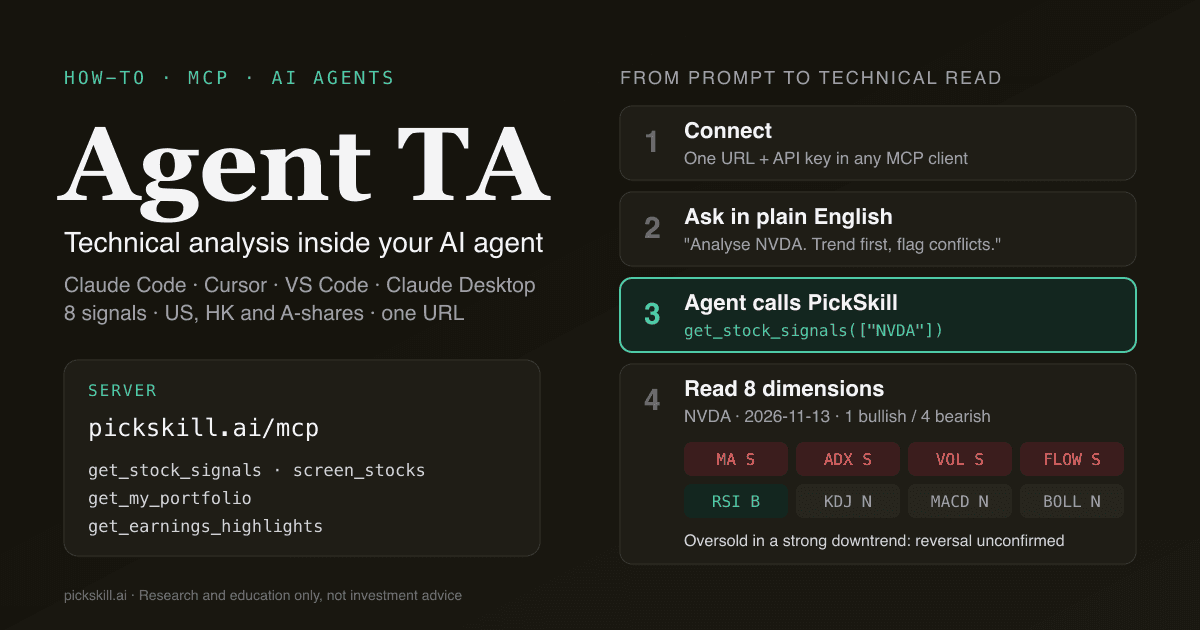
AI agent technical analysis with PickSkill MCP means your AI agent — Claude Code, Cursor, VS Code, Claude Desktop or any other MCP client — calls PickSkill's hosted tools to pull eight daily technical signals (MACD, moving averages, RSI, KDJ, Bollinger Bands, ADX, volume, money flow) for US, Hong Kong and China A-share stocks, then reasons over them in plain English. You stop pasting charts into a chat window. The agent fetches structured, dated signal data itself, compares tickers, screens a 71-stock universe and checks your saved portfolio. In our own test on 2026-11-13 data, one screen ("MACD golden cross in the last 5 days and money flowing in") took a single tool call and returned 10 matches out of 71 stocks, each with the evidence attached.
Key takeaways
- One URL, four tools.
https://pickskill.ai/mcpgives any MCP-capable AI agentget_stock_signals,screen_stocks,get_my_portfolioandget_earnings_highlights. - Eight dimensions, each with a 5-day trail. The agent sees not just today's reading but whether it has held for a week, which is what separates a trend from noise.
- Six workflows cover most daily use: a single-stock check, a peer comparison, a one-sentence screen, a portfolio health check, technicals plus fundamentals, and scheduled scans.
- Read-only and quota-metered. Each tool call counts as one conversation on your plan (30 a month on Free). Keys can't touch your account.
- Research, not advice. Every tool result carries that reminder, and a good agent prompt keeps the bear case on the table.
What is the PickSkill MCP server?
The PickSkill MCP server is a hosted remote server that speaks the Model Context Protocol, the open standard AI agents use to call external tools. It lives at https://pickskill.ai/mcp, authenticates with a personal API key sent as Authorization: Bearer <key>, and exposes four read-only tools built on the same data that powers PickSkill's free stock signal pages and the portfolio indicators dashboard. Because the data arrives as structured JSON rather than a screenshot, the agent can compare numbers exactly, count bullish and bearish readings, and quote the indicator values it relied on. Signals refresh daily, and every result is stamped with its asOf date so the agent knows how fresh its inputs are. Full setup lives on the PickSkill MCP page.
| Tool | What it returns | Best for |
|---|---|---|
get_stock_signals | Up to 10 tickers: close, 1-day and 5-day change, 8 signal dimensions with 5-day trails and raw values | Single-stock checks, peer comparisons |
screen_stocks | Every stock in the covered universe matching up to 8 ANDed conditions, with evidence | Finding setups ("RSI under 35", "fresh MACD golden cross") |
get_my_portfolio | Your saved PickSkill portfolios: holdings, weights, signals, bullish/bearish counts | Daily portfolio health checks |
get_earnings_highlights | Latest EPS vs. estimate plus valuation, margin, return and growth ratios | Pairing a technical read with fundamentals |
Which AI agents can use PickSkill for technical analysis?
Any AI agent that supports remote MCP servers over streamable HTTP with a custom header can use PickSkill. Four clients are documented and tested. Create a key on your account page first, then replace <YOUR_API_KEY>.
Claude Code — run once in your terminal:
claude mcp add --transport http pickskill https://pickskill.ai/mcp \
  --header "Authorization: Bearer <YOUR_API_KEY>"
Cursor — add to ~/.cursor/mcp.json:
{ "mcpServers": { "pickskill": { "url": "https://pickskill.ai/mcp",
  "headers": { "Authorization": "Bearer <YOUR_API_KEY>" } } } }
VS Code (agent mode) — add to .vscode/mcp.json:
{ "servers": { "pickskill": { "type": "http", "url": "https://pickskill.ai/mcp",
  "headers": { "Authorization": "Bearer <YOUR_API_KEY>" } } } }
Claude Desktop — add to claude_desktop_config.json (it bridges through mcp-remote):
{ "mcpServers": { "pickskill": { "command": "npx",
  "args": ["-y", "mcp-remote", "https://pickskill.ai/mcp", "--header", "Authorization:${AUTH_HEADER}"],
  "env": { "AUTH_HEADER": "Bearer <YOUR_API_KEY>" } } } }
| AI agent | Where it shines for technical analysis |
|---|---|
| Claude Desktop | Conversational research: "walk me through this chart setup" |
| Claude Code | Scripted and scheduled scans, writing reports to files, headless runs |
| Cursor / VS Code | Building your own dashboards or backtests with live signals in context |
| Other MCP clients | Same tools, same JSON — anything that speaks remote MCP |
How does an AI agent read the 8 signal dimensions?
An AI agent reads PickSkill's eight dimensions best when it treats them as two groups that answer different questions. Trend-following dimensions — moving averages, ADX, MACD and money flow — answer "which way is the stock going, and how strongly?" Oscillators — RSI, KDJ and Bollinger Bands — answer "is the move stretched?" Each dimension comes back as bullish, bearish or neutral, plus a last5 string such as SSSSS (bearish five days running) and the raw values behind it. One convention trips up both humans and models: for RSI and KDJ, bullish means oversold, a mean-reversion reading, not an uptrend. So a stock can show bullish RSI inside a powerful downtrend, and that combination is a warning, not a buy signal. A well-prompted agent counts agreement within each group, checks whether readings have persisted across the 5-day trail, and only calls a setup "confirmed" when trend and momentum line up.
The method we recommend putting in your prompt:
- Trend first. Read
maandadx. Price below MA5 < MA20 < MA60 with ADX above 25 is a strong downtrend; reverse it for an uptrend. ADX below 20 means no trend worth following. - Persistence second. A reading that held 5/5 days (
BBBBBorSSSSS) matters far more than a one-day flip. - Oscillators third. Use RSI and KDJ to time within the trend, never against a strong one.
- Confirm with participation. Volume and money flow show whether real money backs the move.
- State the conflict. When groups disagree, the agent should say so explicitly instead of averaging them into a vague "neutral".
What can you do with it? Six workflows with real output
Every example below uses live PickSkill MCP output from the 2026-11-13 close. Prices and readings will have moved by the time you read this. The workflows are the point, not the tickers.
1. Single-stock technical check
Prompt: "Use PickSkill to analyse NVDA's technicals. Trend first, then oscillators, then flag conflicts."
The agent calls get_stock_signals with ["NVDA"] and gets back one bullish dimension and four bearish:
| Dimension | Reading | 5-day trail | Key values |
|---|---|---|---|
| MA | Bearish | SSSSS | MA5 170.07 / MA20 198.69 / MA60 215.25 |
| ADX | Bearish | SSSSS | ADX 41.6, −DI 47.4 vs +DI 9.1 |
| Volume | Bearish | SSSSS | Volume ratio 1.74 |
| Money flow | Bearish | SSSSS | 5-day net outflow, bearish every day |
| RSI | Bullish (oversold) | BBBBB | RSI 24.9 |
| KDJ | Neutral | BBBBN | K 20.0 / D 17.0 |
| MACD | Neutral | SSNSN | Histogram −8.25 |
| Bollinger | Neutral | SSNNN | Close 162.85 vs lower band 159.94 |
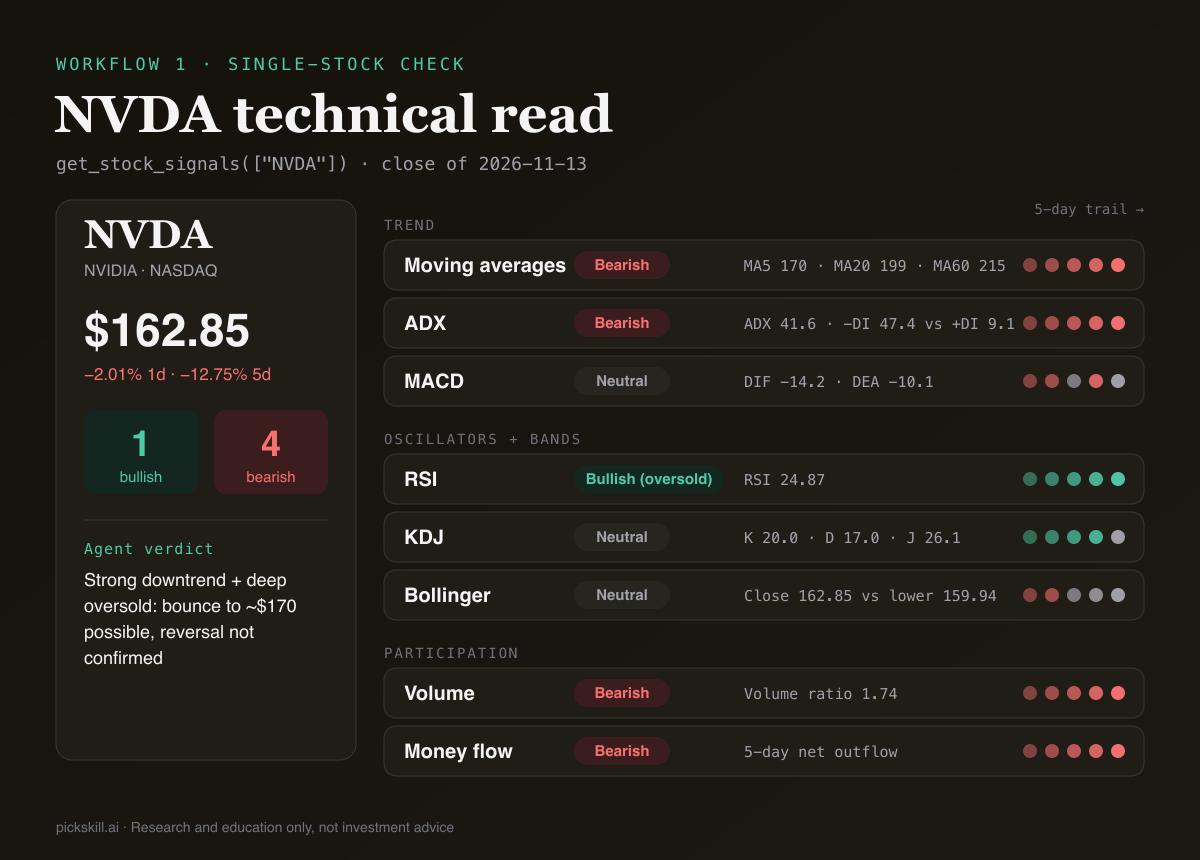
What a good agent concludes: a strong, persistent downtrend (ADX above 40, bearish averages, outflows five days running, high-volume selling) with the stock deeply oversold and sitting on its lower Bollinger Band. A bounce toward MA5 (~$170) is plausible. A trend reversal is not yet confirmed. That is exactly the "oversold in a downtrend" trap our oversold-stocks guide warns about.
2. Peer comparison in one call
Prompt: "Compare NVDA, AMD, AVGO, TSM and SMIC (0981.HK) on PickSkill signals. Rank by technical strength and explain."
One get_stock_signals call takes up to 10 tickers, across markets:
| Ticker | 5-day change | Bullish | Bearish | Standout reading |
|---|---|---|---|---|
| AMD | +18.9% | 2 | 0 | Volume and money flow bullish 5/5 days |
| AVGO | +18.2% | 2 | 1 | MACD turned bullish 3 days ago |
| 0981.HK | +6.5% | 2 | 1 | MACD bullish 5/5, ADX flipped bullish |
| TSM | +6.2% | 2 | 2 | MACD bullish, but ADX bearish 5/5 |
| NVDA | −12.8% | 1 | 4 | Downtrend on MA, ADX, volume, flow |
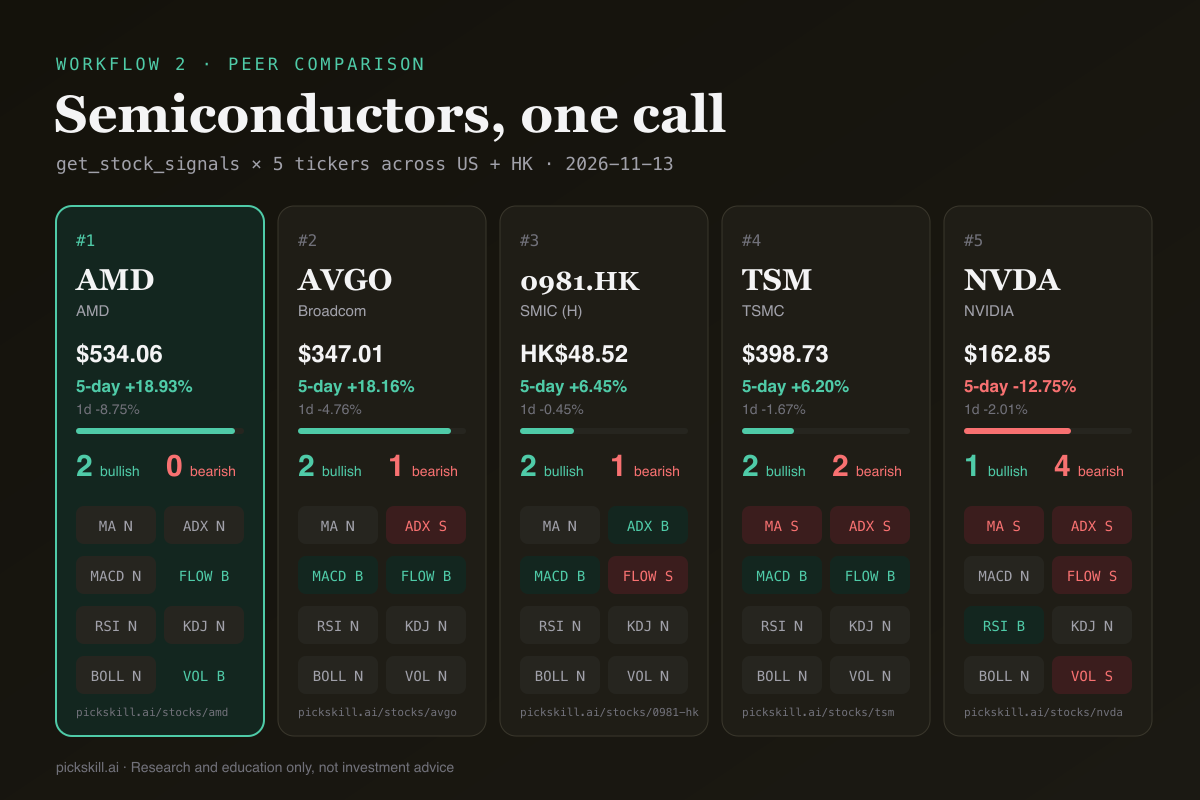
The agent can see what a single chart never shows: in the same week, money rotated within semiconductors, out of NVDA and into AMD and AVGO. That is a relative-strength observation the agent can back with numbers.
3. Screening in one sentence
Prompt: "Find stocks with a MACD golden cross in the last 5 days where money flow is also bullish."
The agent translates that into screen_stocks conditions, a macd_golden_cross event within 5 days ANDed with a bullish flow signal, and PickSkill screens its whole universe:
- Universe: 71 stocks across US, HK and A-shares. Matches: 10.
- Top results included Bank of China (3988.HK), Cambricon (688256), AMD, AVGO, TSM, Akamai (AKAM) and Rocket Lab (RKLB).
- Each match carries evidence, e.g. "MACD golden cross 2 days ago (DIF −8.4, DEA −15.98)".
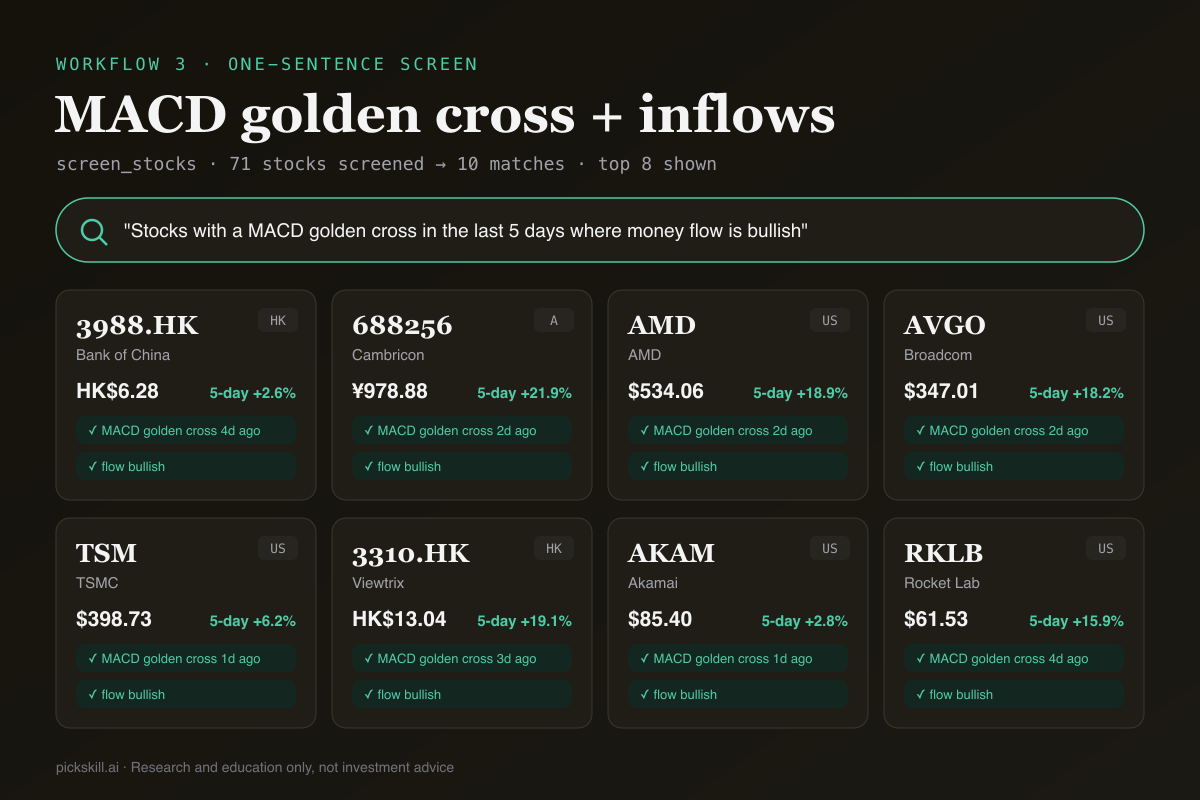
Useful follow-ups: "Only US stocks", "Sort by RSI, lowest first", "Drop anything with ADX below 20". Each one is a refined call, not a new spreadsheet. For the logic behind crossover screens, see How to Screen Stocks for a Golden Cross.
4. Portfolio health check
Prompt: "Check my PickSkill portfolios. Which holdings have turned bearish this week, and which are oversold?"
get_my_portfolio reads the portfolios you saved on PickSkill Portfolios and returns every holding with its weight, price change, signals and bullish/bearish counts. The agent can then weight its answer: a bearish flip in a 20% position matters more than one in a 2% position. This is the agent version of the workflow in Track a Portfolio with Indicators.
5. Technicals plus fundamentals
Prompt: "Pull NVDA's earnings highlights and reconcile them with the technical picture."
get_earnings_highlights returned NVDA's last report (2026-08-26): EPS $2.22 vs. $2.09 expected (+6.2%), revenue growth of 106% year on year, a 75% gross margin, and a forward P/E around 10. The agent's job is to name the divergence: the business numbers are strong while price action is the weakest in its peer group. That points to a sector or macro driver rather than company-specific deterioration, and it's a hypothesis to check against the news, not a conclusion. Our guide to technical vs. fundamental analysis covers how to weigh the two.
6. Scheduled scans with a headless agent
Claude Code can run non-interactively, which turns PickSkill into a daily scanner:
claude -p "Use PickSkill to screen US stocks with RSI below 30 and ADX above 25. \
Write a markdown summary with the evidence for each match to scans/$(date +%F).md" \
  --allowedTools "mcp__pickskill__screen_stocks,Write"
Put it in cron after the US close and you get a dated file every trading day. Each run costs one conversation per tool call, so a daily one-screen scan fits in the Starter plan's 200 a month.
How do you write prompts that get better technical analysis?
The best prompts tell the agent how to reason, not just what to fetch. Agents default to summarising every indicator in order, which buries the signal. Steer them instead:
- Name the reading order: "trend → persistence → oscillators → participation."
- Ask for the conflict: "If trend and oscillators disagree, say which one you'd trust and why."
- Demand the numbers: "Quote the indicator values you relied on." This makes the answer checkable.
- Ask for levels: "Give support and resistance from MA5, MA20 and the Bollinger Bands."
- Keep the bear case: "End with what would invalidate this read."
- Batch tickers: ask for up to 10 tickers in one comparison. It's one call, not ten.
For a combined filter that works well as a standing instruction, see the three-indicator filter.
What are the limits of AI agent technical analysis?
PickSkill MCP gives agents daily signals, not intraday ticks. The data suits swing and position decisions, not day trading. The screener covers PickSkill's tracked universe (71 stocks at the time of writing, the same names as the /stocks pages), not every listed company. Earnings highlights are most complete for US-listed companies. Technical signals describe past price action and do not predict returns. An agent can reason over them more consistently than a tired human at midnight, but it cannot know news it hasn't been given. Treat the output as a structured second opinion, and pair it with your own thesis and risk limits.
FAQ
What is the PickSkill MCP server? It is a hosted remote MCP server at https://pickskill.ai/mcp that gives AI agents four read-only tools: technical signals for US, Hong Kong and China A-share stocks, screening by those signals, your saved PickSkill portfolios, and earnings highlights. You connect with one URL and a personal API key.
Which AI agents work with PickSkill MCP? Claude Code, Claude Desktop, Cursor and VS Code agent mode are documented and tested. Any other client that supports remote MCP servers over streamable HTTP with a custom Authorization header can use the same URL and key.
How many tool calls does a technical analysis use?
A single-stock check or a 10-ticker comparison is one get_stock_signals call. A screen is one screen_stocks call. Each call counts as one conversation: 30 a month on Free, 200 on Starter, 1,000 on Pro and unlimited on Power. Failed calls are not counted.
Why does PickSkill mark an oversold RSI as bullish? RSI and KDJ are mean-reversion oscillators, so an oversold reading is bullish in the sense that a bounce becomes more likely. It does not mean the trend is up. Always read RSI together with moving averages and ADX before acting on it.
Can an AI agent change my PickSkill account through MCP? No. API keys only work with the read-only MCP tools. A key cannot sign in, edit portfolios or read your chats, and you can revoke it on your account page at any time.