Best MCP Servers for Stock Market Data (2026)
Seven stock-data MCP servers for Claude and other AI agents, compared on coverage, technical signals, Asian markets, auth and pricing. Checked Nov 2026.

The best MCP server for stock market data depends on the job: Alpha Vantage, Financial Modeling Prep (FMP), EODHD and Massive (formerly Polygon.io) are the strongest for raw prices, history and fundamentals, Financial Datasets is the deepest on US SEC filings, and PickSkill is built for computed technical signals and screening across US, Hong Kong and China A-share stocks. A stock-data MCP server is a tool server that speaks the Model Context Protocol, so Claude, Cursor or any MCP client can fetch market data itself instead of you pasting it into the chat. Free entry points range widely: Alpha Vantage lists 25 requests a day on its free key, FMP lists 250 calls a day on Basic, and EODHD 20 calls a day (vendor pricing pages, checked November 2026).
We compared seven servers, using only what each vendor's own docs, GitHub repo or pricing page said in November 2026. Plans and tool lists change often, so treat the numbers as a dated snapshot and re-check the linked pages before you pay.
Key takeaways
- Six of the seven run as hosted remote servers with an official URL; four of them (Alpha Vantage, FMP, Financial Datasets, EODHD) support OAuth sign-in, so no key has to sit in a config file.
- Raw data vs. computed signals is the real split. Most servers return price series or indicator values; PickSkill returns a reading (bullish, bearish or neutral) for 8 indicator dimensions, each with a 5-day trail, plus a ~950-stock screen.
- Asian market coverage varies more than anything else. Massive's stock data is US-only, Financial Datasets is US-centred, and FMP gates global coverage to its Ultimate plan.
- Pricing models differ: monthly rate-limit tiers (Alpha Vantage, FMP, EODHD, Massive), request bundles (Financial Datasets) or prepaid per-call credits (PickSkill).
- Many setups use two servers: one for history and statements, one for a ready-made technical read.
What is a stock market data MCP server?
A stock market data MCP server is a small service that exposes financial data as tools an AI agent can call. Instead of reading a REST API reference and writing wrapper code, you register one URL (remote) or one command (local) in your MCP client, and the model discovers the tools, their parameters and descriptions on its own. When you ask "compare Apple's and Microsoft's margins over five years", the agent picks the statements tool, calls it with the right tickers and reasons over structured JSON.
Remote servers run on the vendor's infrastructure and usually authenticate with an API key header or OAuth. Local servers run on your machine through uv, npx or Docker and read a key from an environment variable. Either way, the data quality, market coverage and rate limits are those of the vendor behind the server — the MCP layer only changes how your agent reaches it.
Which MCP servers for stock data are worth comparing in 2026?
Seven servers cover most real-world needs, from free hobby use to commercial data feeds. Below is what each offers, checked November 2026 against the vendor's own pages.
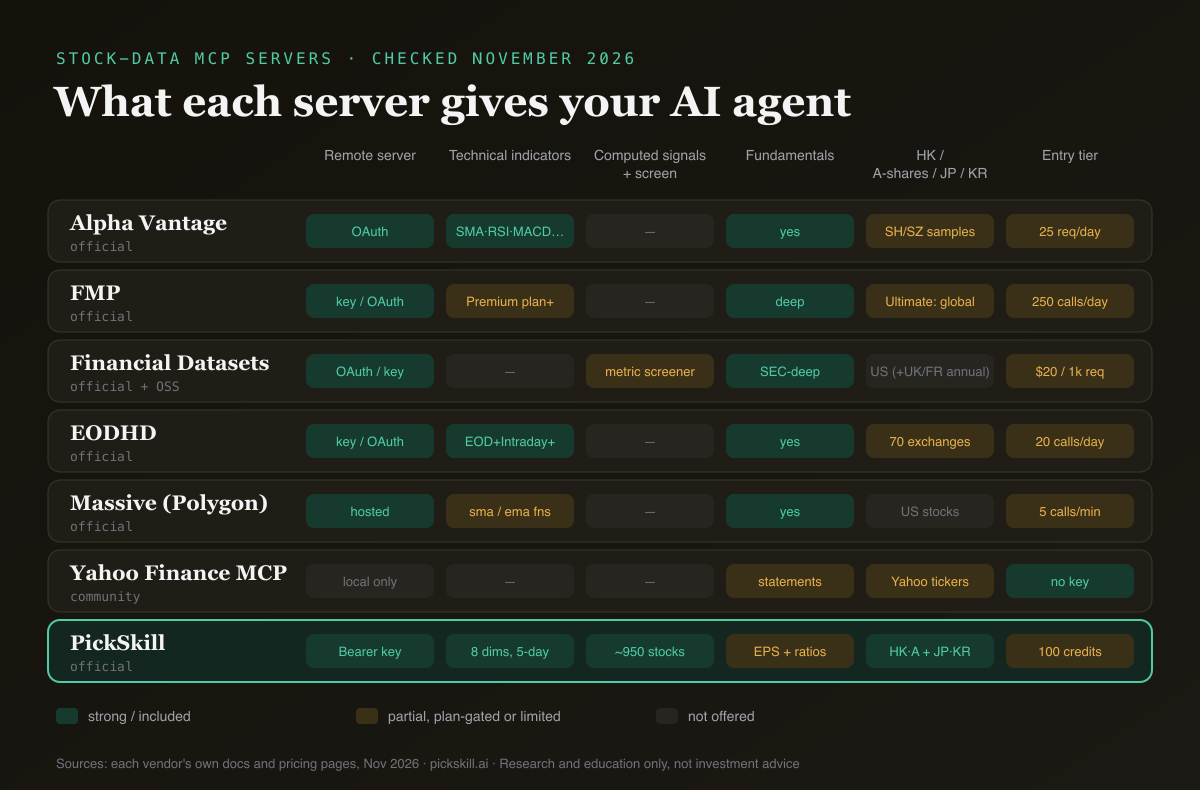
| Server | Data coverage | Computed signals vs raw data | Auth / hosting | Pricing model | Best for |
|---|---|---|---|---|---|
| Alpha Vantage | Prices, fundamentals, options, forex, crypto, commodities, economic data, news; 100,000+ global symbols, docs show Shanghai and Shenzhen tickers | Raw indicator series (SMA, EMA, RSI, MACD, BBANDS, ATR…) | Remote mcp.alphavantage.co/mcp with OAuth; local via uvx | Free key 25 req/day; premium from $49.99/mo | Broad, cheap all-rounder |
| FMP | Quotes, statements, SEC filings, calendars, news; US on Starter, UK/Canada on Premium, global on Ultimate | Raw indicators (Premium and above) | Remote financialmodelingprep.com/mcp, API key or OAuth via Claude/ChatGPT connectors | Basic free 250 calls/day; Starter $29, Premium $69, Ultimate $139 per month | Fundamentals-heavy research |
| Financial Datasets | Statements, SEC filings, insider and 13F holdings, earnings, KPIs, news, macro; US-centred, annual UK/French fundamentals | Raw data; metric-based screener | Remote mcp.financialdatasets.ai (OAuth), key endpoint for scripts; open-source local server | $20 for 1,000 requests; $200/mo for 100,000 | US filings and KPIs |
| EODHD | 72 read-only tools: EOD, intraday, tick, fundamentals, exchanges; 70 exchanges listed | Raw indicators plus support/resistance levels | Remote v1 (key in URL) or v2 (OAuth 2.1); open-source local | Free 20 calls/day; $19.99–$99.99/mo | Global end-of-day history |
| Massive (Polygon) | US stocks, options, forex, crypto, futures; fundamentals, Benzinga news | Raw data; built-in sma/ema functions over results | Hosted mcp.massive.com; local (marked experimental) | Stocks Basic free (5 calls/min, EOD); $29–$199/mo | US market microstructure |
| Yahoo Finance MCP | 9 tools: prices, statements, holders, options, news, recommendations | Raw data only | Local only, built on yfinance (not affiliated with Yahoo) | Free, no key | Hobby projects and prototyping |
| PickSkill | US, Hong Kong, China A-shares; Tokyo and Korea tickers for signals; earnings highlights and key ratios | Computed: 8 signal readings with 5-day trail; screen ~950 stocks | Remote pickskill.ai/mcp, Bearer API key | Prepaid credits: 100 free, then $10 per 1,000 | Technical reads, screens, portfolio checks |
How do raw-data servers differ from computed-signal servers?
Raw-data servers hand your agent numbers and leave the interpretation to the model. Ask Alpha Vantage for RSI and you get a series of RSI values; ask EODHD and you get indicator output over a date range. That is exactly what you want for back-tests, custom models or long history. The cost is that the agent has to fetch several series, line up dates and decide what "oversold" or "trend weakening" means, which spends tool calls and context and leaves room for the model to improvise thresholds.
A computed-signal server does that step for you. PickSkill's get_stock_signals returns, for each ticker, a bullish / bearish / neutral reading on MACD, moving averages (20/60/200), RSI(14), KDJ(9,3,3), Bollinger Bands(20,2), ADX/DMI(14), volume and money flow, each with the last five daily readings and the underlying values. Our post on AI agent technical analysis with MCP shows what an agent does with that output. The trade-off is scope: PickSkill does not serve long OHLCV history, intraday bars or full financial statements, which is where the raw-data servers above are stronger.
Which MCP servers cover Hong Kong, A-shares, Japan and Korea?
Coverage of Asian markets is where these servers differ most, and vendor docs are rarely explicit. Alpha Vantage says it supports 100,000+ global symbols and its documentation includes Shanghai (600104.SHH) and Shenzhen (000002.SHZ) sample tickers.
EODHD lists 70 exchanges as of August 2026; its exchange page did not name the Asian venues when we checked, so call its exchange-list endpoint to confirm the ones you need. FMP places "Global Coverage" on its Ultimate plan. Massive's stock data covers US exchanges, and Financial Datasets is built around SEC filings, with annual UK and French fundamentals as its international layer.
PickSkill's signals and screener are built for US, Hong Kong and China A-shares: the screener universe is the S&P 500, Nasdaq-100, Hang Seng Index and CSI 300 members plus every stock with a PickSkill page. In our test on 19 November 2026, get_stock_signals also returned full readings for Toyota (7203.T) and Samsung Electronics (005930.KS); Japanese and Korean stock pages were added in November 2026. Screening itself stays limited to the US, HK and A-share universe.
How to choose an MCP server for stock data
The right pick follows from the question you want your agent to answer, not from the longest tool list. Work through these in order:
- Name the task. Back-testing, valuation and filings work need raw history and statements (Alpha Vantage, FMP, EODHD, Financial Datasets). Daily technical reads, screens and portfolio checks benefit from computed signals (PickSkill).
- List your markets. If you hold Hong Kong, A-share, Japanese or Korean stocks, confirm coverage on the vendor's own exchange list before paying — "global" often depends on the plan.
- Decide remote or local. Remote servers need no install and work in Claude on the web; local servers give you control, but you maintain them.
- Check auth. Prefer OAuth or a header over a key in the URL, which can end up in logs. FMP's own docs make the same point.
- Estimate call volume. An agent can call tools many times per question. Daily caps (25, 250 or 20 calls) run out fast; per-call credits or per-minute tiers suit bursty agent use better.
- Read the licence. Personal-use plans usually forbid showing the data to other users; Financial Datasets and FMP both separate personal and commercial licences.
How do you set up a stock data MCP server in Claude Code?
Setup takes about a minute for any remote server: add the URL, authenticate, then ask a question. For PickSkill, create an API key on your account page (every account gets 100 free credits), then run:
claude mcp add --transport http pickskill https://pickskill.ai/mcp \
  --header "Authorization: Bearer <YOUR_API_KEY>"
Cursor, VS Code and Claude Desktop snippets are on the PickSkill MCP page; the same key also works with the REST API. Then ask in plain English, for example: "Screen Hang Seng stocks with RSI under 30."
The agent calls screen_stocks (3 credits; screening needs a paid plan). When we ran that screen on data as of 19 November 2026, it checked 85 Hang Seng stocks and returned 12 matches, each with its RSI value as evidence. get_stock_signals and get_my_portfolio cost 1 credit, get_earnings_highlights 2, and failed calls are refunded.
Raw-data servers follow the same pattern. Alpha Vantage and Financial Datasets are listed in Claude's connectors directory; FMP documents adding its URL as a custom connector; Massive's local server installs with uv and registers with claude mcp add. Running two servers side by side is normal: let one fetch statements and the other give the technical read, and tell the agent which to use for what.
What are the limits of stock-data MCP servers?
An MCP server makes data easier for an agent to reach, but it does not make the data more correct or the model's conclusions safer. End-of-day data is stale intraday; free tiers are often delayed or capped; and a model can still misread a value or invent a threshold if the tool output is ambiguous. Computed signals describe past price action, not future returns.
Treat every tool result as one input, keep the date stamp in view (most responses carry an asOf or date field), and cross-check anything you would act on. For a broader view of where AI fits in a research routine, see our guide to AI for stock research in 2026 and how technical and fundamental analysis complement each other.
Research and education only, not investment advice.
FAQ
What is the best free MCP server for stock data?
For no-cost use, the community Yahoo Finance MCP server needs no API key but runs locally on the open-source yfinance library, which is not affiliated with Yahoo. Among official hosted servers, FMP's Basic plan lists 250 calls a day, Alpha Vantage 25 requests a day and EODHD 20 calls a day. PickSkill gives every account 100 free credits for signal calls (checked November 2026).
Can Claude get real-time stock prices through MCP? Yes, if the vendor's plan includes real-time data. FMP lists real-time data from its Starter plan, Massive from Stocks Advanced ($199 a month), and Financial Datasets on all plans. Free tiers are usually end-of-day or delayed. PickSkill focuses on daily signals refreshed after each market close, not live quotes.
Which stock MCP server supports Hong Kong and China A-shares? PickSkill's signals and screener cover US, Hong Kong and China A-shares, and its signal tool also accepted Tokyo and Korean tickers in our November 2026 test. Alpha Vantage documents Shanghai and Shenzhen tickers. EODHD lists 70 exchanges; confirm specific Asian venues with its exchange-list endpoint. Massive's stock data is US-only.
Do I need to code to use a stock data MCP server? No. With a remote server you paste one URL into Claude's connector settings, or run one command in Claude Code, then ask questions in plain English. Local servers need Python or Node.js and a terminal. Writing your own scripts against the server is optional.
Is it safe to give an MCP server my API key? Use read-only keys and prefer OAuth or a header over a key in the URL. PickSkill keys only reach its four read-only tools and REST API; they cannot sign in, change portfolios or read chats, and you can revoke them at any time from your account page.