Koyfin Alternatives in 2026: 8 Tools by Price
Koyfin vs TradingView, Finviz, Stock Rover, TIKR, Fiscal.ai, Simply Wall St, OpenBB and PickSkill: charting, screeners, AI and Asian markets, priced Nov 2026.
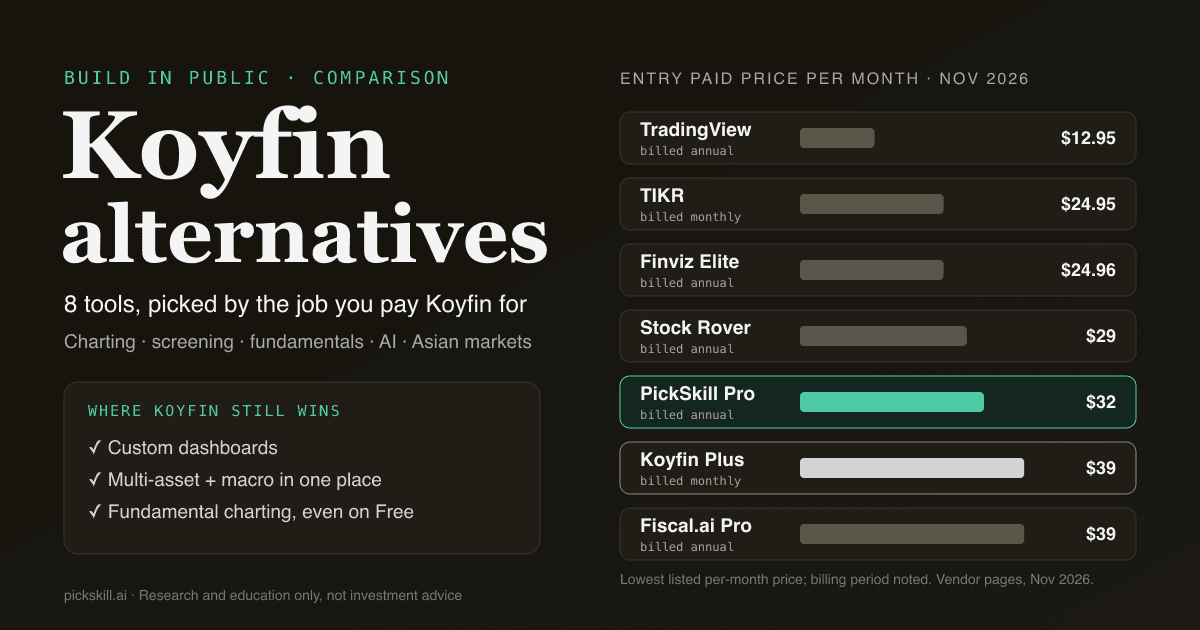
The best Koyfin alternative depends on which part of Koyfin you use: TradingView for charting, Finviz or Stock Rover for cheaper US screening, TIKR or Fiscal.ai for deep fundamentals, and PickSkill for signal screening with an AI analyst across US, Hong Kong and China A-shares. A Koyfin alternative is any tool that replaces part of Koyfin's dashboards, charts, screeners or multi-asset data. As listed on koyfin.com/pricing in November 2026, Koyfin's paid plans start at $39/month (Plus) and $79/month (Premium), with a free plan capped at 2 watchlists, 2 screens and 2 dashboards.
Koyfin is good at a lot, so most people do not replace all of it. They swap out the one job they pay for. This guide maps each job to a tool, with prices taken from each vendor's own page in November 2026. We build PickSkill, so read our section with that in mind.
Key takeaways
- Koyfin still wins on custom dashboards, multi-asset and macro data in one place, and fundamental charting on its free plan.
- TradingView is the stronger charting tool. Paid plans start at $12.95/month billed annually, and it lists data from the Hong Kong, Shanghai, Shenzhen, Tokyo and Korea exchanges.
- Finviz and Stock Rover are cheaper US-focused screeners. Finviz covers only NYSE, NASDAQ and AMEX, and Stock Rover only the US and Canada.
- TIKR, Fiscal.ai and Simply Wall St go deeper on global fundamentals. OpenBB is the free, open-source, build-it-yourself route.
- PickSkill is not a charting terminal. It screens about 950 US, Hong Kong and A-share stocks by technical signals and adds an AI analyst and a five-model AI Panel, starting at $32/month billed annually.
What does Koyfin actually do well?
Koyfin is a web-based market data terminal for investors who want Bloomberg-style screens without a Bloomberg budget. Its own product summary describes advanced charting of price, fundamentals and valuation, screeners for equities, mutual funds, ETFs and SMAs with "over 500 filters", and custom dashboards that combine charts, tables and securities in one view. It covers global equities, ETFs, mutual funds, fixed income, FX, crypto and macro data (koyfin.com/llm-info). Its data overview says US equities get live or delayed prices and "all other markets are end-of-day" (data overview). The Free plan includes advanced charting, 2 years of financials and 1 year of estimates. Plus ($39/month) unlocks 10 years of history, unlimited screens and dashboards, plus filings and transcripts. Annual billing saves "up to 30%".
What Koyfin's pricing and help pages did not list in November 2026 was a built-in AI assistant, or a per-exchange list showing how deep its Hong Kong, A-share, Japan and Korea data goes. Those two gaps, plus price, are the usual reasons people look elsewhere.
Which Koyfin alternatives fit which job?
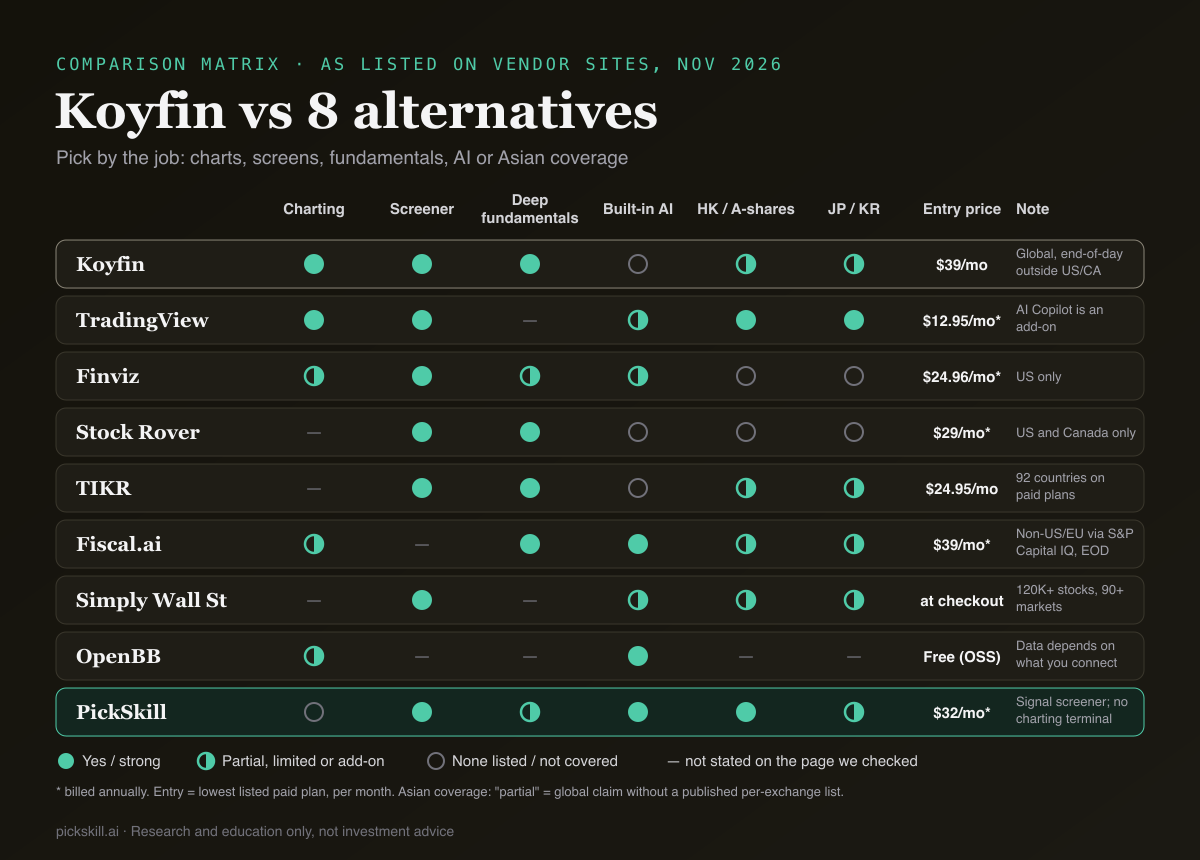
The short answer: pick by the job, not by the brand. The table compares nine tools on the dimensions people ask about most. Every value comes from the vendor's own pricing, help or product page as listed in November 2026. A dash (—) means the page we checked did not state it, not that the feature is missing.
| Tool | Best for | Charting | Screener | Fundamentals depth | AI features | HK / A-shares / JP / KR | Entry paid price | Free tier |
|---|---|---|---|---|---|---|---|---|
| Koyfin | Dashboards, multi-asset and macro | Advanced, on Free too | 500+ filters; stocks, ETFs, funds, SMAs | 2Y free, 10Y on Plus | None listed | "All global stocks"; end-of-day outside US/Canada | Plus $39/mo | Yes: 2 watchlists, 2 screens, 2 dashboards |
| TradingView | Charting and technical traders | 1–16 charts per tab, 2–50 indicators | Stocks, ETFs, crypto; AI Screener scans | — | AI Screener; AI Copilot (add-on, included on Ultimate) | All four listed; real-time is a paid add-on | Essential $12.95/mo (annual) | Yes: 1 chart, 2 indicators |
| Finviz | Fast US screening and heatmaps | Interactive charts on Elite | Basic free, advanced on Elite | 3Y free, 8Y on Elite | AI-written price-move explanations | US only | Elite $39.50/mo or $24.96/mo (annual) | Yes, delayed data |
| Stock Rover | US/Canada fundamentals and portfolios | — | 15 to 300+ saved screeners by plan | 5Y (Premium) to 20Y | None listed | US and Canada only | Premium $34/mo or $29/mo (annual) | Yes, basic |
| TIKR | Global fundamentals on a budget | — | 1 to unlimited saved screens | 5Y free, 10Y Plus, 30Y Ultimate | None listed | 100,000+ stocks, 92 countries on paid plans | Plus $24.95/mo | Yes, US stocks only |
| Fiscal.ai | AI terminal on KPIs and segments | Fundamental charting | — | 10Y / 15Q of KPIs on Pro, full on Max | AI chat copilot | Global; non-US/EU data from S&P Capital IQ, end-of-day | Pro $49/mo or $39/mo (annual) | Yes, limited |
| Simply Wall St | Visual long-term fundamentals | — | Yes; free shows top 4 results | — | Charlie AI (limited on every plan) | 120K+ stocks, 90+ markets | Shown at checkout | Yes: 5 reports/mo, 10 holdings |
| OpenBB | Build your own, self-hosted | Dashboards and widgets | — | Depends on data you connect | Copilot and AI agents | Depends on data you connect | Community Edition free | Yes, open source |
| PickSkill | Signal screening plus AI analyst | No charting terminal | 8 technical dimensions, up to 8 conditions, ~950 stocks | Fundamentals and earnings via the AI analyst | AI analyst, five-model AI Panel, MCP | HK and A-shares in screener; JP/KR stock pages and AI Panel | Pro $39/mo or $32/mo (annual) | Yes: 5 chats, 1 AI Panel run |
Which Koyfin alternative is best for charting?
TradingView is the clearest Koyfin alternative if charts are what you open the app for. Its free Basic plan allows 1 chart per tab and 2 indicators per chart. Essential costs $12.95/month billed annually for 2 charts and 5 indicators, and Premium costs $59.95/month for 8 charts and 25 indicators (TradingView pricing). Its data coverage page lists the Hong Kong, Shanghai, Shenzhen, Tokyo and Korea exchanges, with delayed data free and real-time data as a paid add-on (data coverage). Paid plans now include an AI Screener and MCP requests; the AI Copilot is a paid add-on except on Ultimate.
Where Koyfin still wins: fundamental charting. Plotting EV/EBITDA or margins against peers over ten years is Koyfin's home ground. TradingView is built around price.
What is the cheapest Koyfin alternative for screening US stocks?
For US-only screening, Finviz and Stock Rover undercut Koyfin. Finviz's free screener is useful on its own, and Elite costs $39.50/month or $24.96/month billed annually. It adds real-time data, 8 years of financials, advanced filters and exports. Finviz says it covers only NYSE, NASDAQ and AMEX and has "no plans for expanding into new markets" (Finviz Elite). Stock Rover Premium is $29/month billed annually and Premium Plus is $49/month. Screener counts run from 15 to "300+" by plan, and fundamentals go up to 20 years (Stock Rover plans). Stock Rover's own 2026 review describes its coverage as US and Canadian listings.
Neither helps if you also hold Tencent or Kweichow Moutai. That is the gap the next two sections cover.
Which alternatives go deeper on global fundamentals?
TIKR, Fiscal.ai and Simply Wall St all aim at the "research a company properly" job rather than the dashboard job. TIKR Plus costs $24.95/month with 10 years of financials. Paid plans list "full global data", which its homepage puts at 100,000+ stocks in 92 countries, though the free plan is US-only (TIKR pricing). Fiscal.ai's help center lists Pro at $49/month ($39 billed yearly) and Max at $99/month ($79 yearly), with an AI copilot on top of segment and KPI data. Its fundamentals outside the US, Canada, UK and EU come from S&P Capital IQ with end-of-day prices. Simply Wall St lists 120K+ stocks in 90+ markets, a free plan with 5 reports a month, and Charlie AI. Its plans page shows paid prices only at checkout.
We compare these in more detail in Fiscal.ai alternatives and, for the institutional end, AlphaSense alternatives.
Is there a free, open-source Koyfin alternative?
Yes: OpenBB. In August 2026 OpenBB said it was open-sourcing its whole product suite under a permissive license, with the Workspace codebase stewarded by FINOS. Its site says the Community Edition "is free for individuals" (openbb.co). You get dashboards, a Copilot and agent access to the data you connect. The catch is that the data is your job: OpenBB is a framework, so coverage and quality depend on the feeds and API keys you bring. It suits investors who code and want full control, not someone who wants a finished terminal tomorrow.
Where does PickSkill fit as a Koyfin alternative?
PickSkill is not a charting terminal, and it will not replace Koyfin's dashboards. It replaces a different job: "show me which stocks have a technical setup right now, then explain one to me." The signal screener covers about 950 stocks in the S&P 500, Nasdaq-100, Hang Seng and CSI 300. Each is scored on 8 indicator dimensions: MACD, moving averages, RSI, KDJ, Bollinger Bands, ADX/DMI, volume and money flow. You combine up to 8 conditions, such as "MACD golden cross today" with "RSI below 50", and it refreshes after each market close.
A real run: on 19 November 2026 (US data as of the 18 Nov close), that exact pair matched 38 of 939 stocks screened. They were 19 A-shares, 16 US stocks, 2 Hong Kong names and 1 Korean stock page. Doing that in a US-only screener is impossible. In a general screener, it means building the A-share universe yourself. From any match you can ask the AI analyst for fundamentals and earnings, or run the AI Panel. There, five models (DeepSeek, Qwen, Kimi, GLM and MiniMax) read the same fact sheet and a judge model tallies their views.
Honest limits: no multi-asset dashboards, no bond or FX terminal, no custom formula charting, and the screener needs Pro ($39/month, or $32/month billed annually, see pricing). Free accounts see how many stocks match. More on how the screener works is on the stock screener page, and a worked example is in screening for golden crosses.
How do you choose a Koyfin alternative?
Start from the job, then check market coverage, then price. Most regret comes from buying a great tool that does not cover the exchange you trade.
- Write down the one Koyfin feature you use most. Dashboards, charts, screens or fundamentals. If it is dashboards plus macro, stay on Koyfin.
- List your markets. If any holdings are in Hong Kong, mainland China, Japan or Korea, cross out Finviz and Stock Rover first.
- Decide whether you want technical or fundamental screening. TradingView, Finviz and PickSkill lean technical. TIKR, Stock Rover and Fiscal.ai lean fundamental.
- Check whether AI should be built in. Fiscal.ai, Simply Wall St, TradingView (add-on), OpenBB and PickSkill include AI; Koyfin's pricing page did not list any.
- Compare annual prices, not monthly. Koyfin saves up to 30% annually, TradingView and Stock Rover discount heavily, and Finviz Elite drops from $39.50 to $24.96 a month.
- Run a free trial on your actual watchlist. Every tool here has a free tier or trial. Test with the ten tickers you really own, not with Apple.
If you mix fundamental and technical work, see technical vs fundamental analysis and our wider roundup of AI tools for stock research.
Prices and features are as listed on each vendor's site in November 2026 and change often. This article is for research and education only, not investment advice.
FAQ
What is the best free alternative to Koyfin? It depends on the job. For charting, TradingView's free Basic plan gives 1 chart per tab and 2 indicators. For US screening, Finviz's free screener is strong. For an open-source terminal you host yourself, OpenBB's Community Edition is free for individuals. Koyfin's own free plan, with 2 watchlists, 2 screens and 2 dashboards, is also competitive.
Is Koyfin cheaper than TradingView? Not at the entry level. As listed in November 2026, Koyfin Plus costs $39/month, while TradingView Essential costs $12.95/month billed annually and Plus $29.95/month. They do different jobs, though. Koyfin focuses on fundamentals, dashboards and multi-asset data. TradingView focuses on price charting, so comparing the price alone can mislead.
Does Koyfin cover Hong Kong and China A-shares? Koyfin says it has prices, financials and estimates for "all global stocks", with end-of-day prices outside the US and Canada. Its pages did not publish a per-exchange list. If Hong Kong or A-shares matter to you, check your tickers on the free plan, or use a tool that lists those exchanges, such as TradingView, TIKR or PickSkill.
Which Koyfin alternative has AI built in? Fiscal.ai has an AI copilot over fundamentals and KPIs, and Simply Wall St has Charlie AI. TradingView offers an AI Screener plus an AI Copilot add-on, and OpenBB has a Copilot and agents. PickSkill pairs an AI analyst and a five-model AI Panel with a technical-signal screener. Koyfin's pricing page listed no AI features in November 2026.
Is PickSkill a replacement for Koyfin? Partly. PickSkill replaces the screening and "explain this stock" jobs for US, Hong Kong and A-share investors, with an AI analyst on top. It does not replace Koyfin's multi-asset dashboards, macro data or fundamental charting. Many investors keep a charting or dashboard tool and add PickSkill for signals.