How to Give Claude and ChatGPT Live Stock Data
Connect Claude, Cursor or Codex to live stock signals via PickSkill's MCP server: setup per client, API-key auth, ChatGPT limits, credit costs.

To give Claude live stock data, add a remote MCP server such as PickSkill's (https://pickskill.ai/mcp) to your Claude client with an API key, and Claude can then call tools that return dated prices and technical signals instead of guessing from its training data. The Model Context Protocol (MCP) is an open standard that lets an AI assistant call external tools through one common interface. PickSkill's server exposes four tools; a signal check for up to 10 tickers costs 1 credit, and every new account gets 100 free credits (pickskill.ai/mcp, November 2026). ChatGPT is the hard case: as of November 2026 its custom MCP flow accepts only OAuth or no authentication, so an API-key server like PickSkill's works through OpenAI's Codex agent instead.
This guide is about the connection itself: which client, where to paste what, and how to confirm it works. If you're already connected and want analysis workflows, read AI agent technical analysis with PickSkill MCP.
Key takeaways
- One URL, one header. Every client gets the same server,
https://pickskill.ai/mcp, and the sameAuthorization: Bearer <key>header. Only the place you paste them changes. - Claude works today in Claude Code, Claude Desktop (via a local
mcp-remotebridge) and claude.ai connectors, though the last one only if your organization has the request-headers beta. - ChatGPT needs a workaround. Its custom MCP servers support OAuth, no auth, or "OAuth or no auth". Use Codex, or call the REST API from your own code.
- Costs are per successful call: 1 credit for signals or portfolios, 2 for earnings, 3 for a screen. Failed calls are refunded.
- Test with one cheap call. Ask for signals on three tickers. If you see
asOfdates and 8 signal dimensions, you're connected.
Why don't Claude and ChatGPT know today's stock prices?
Claude and ChatGPT don't know today's stock prices because a language model only knows what was in its training data, which stops at a cutoff date, and it has no live market feed of its own. Web search helps with headlines, but it returns pages of text, not a dated close price or a computed RSI, MACD or money-flow reading. Ask a plain chatbot "is NVDA oversold?" and it refuses, quotes a stale number, or estimates one from snippets. A tool connection fixes this. The assistant sends a structured request (get_stock_signals with ["NVDA"]), gets JSON back with an asOf date and exact indicator values, and reasons over those numbers. You can expand the tool call and see exactly what it read, so the answer is tied to data you can inspect.
What is MCP, in one paragraph?
The Model Context Protocol is an open standard, introduced by Anthropic in November 2024 and now documented at modelcontextprotocol.io, that defines how an AI application discovers and calls tools on a server. A remote MCP server lives at a URL. When a client such as Claude connects, it asks the server which tools exist (tools/list), shows them to the model, and runs a tools/call whenever the model decides it needs one. PickSkill's server uses the Streamable HTTP transport, is stateless, and returns every result as JSON plus a disclaimer. Listing the tools works without a key; calling one needs your PickSkill API key in the Authorization header. So if tools show up but every call fails, the key is the problem, not the URL.
Which AI clients can connect, and where does the key go?
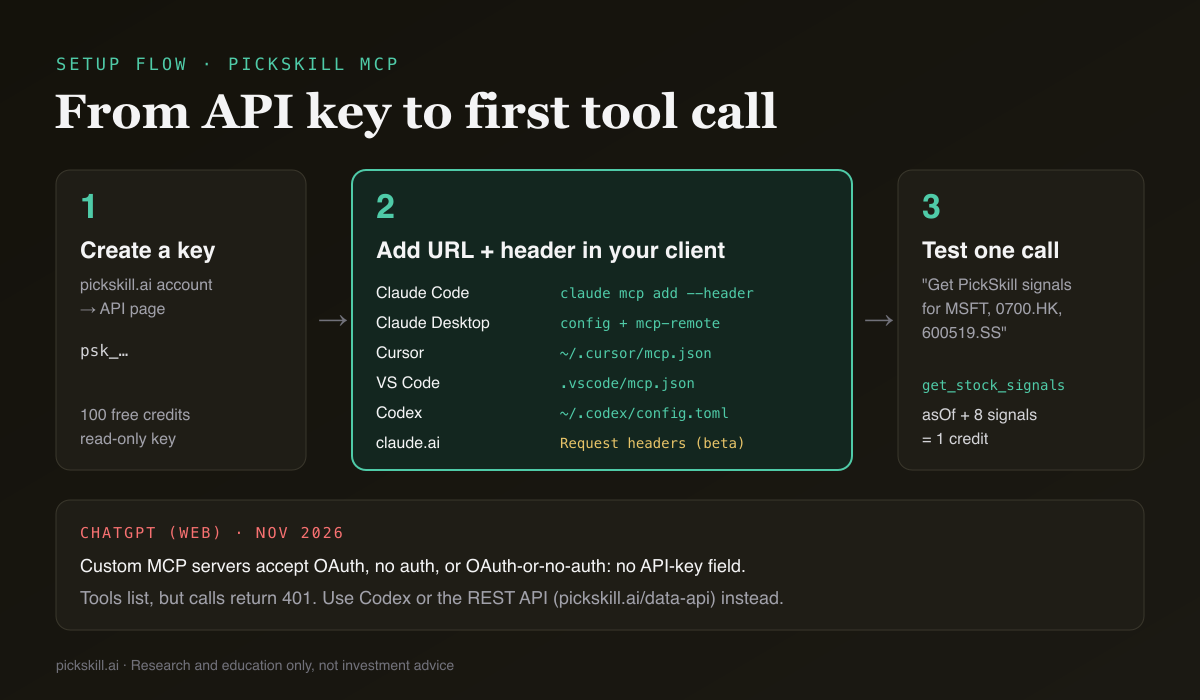
Any client that supports remote MCP over Streamable HTTP and lets you send a custom Authorization header can use PickSkill. The table below covers the major clients as of November 2026, checked against each vendor's own documentation.
| Client | Where you add the server | How the API key is sent | Works with PickSkill? |
|---|---|---|---|
| Claude Code | claude mcp add --transport http … in a terminal | --header "Authorization: Bearer <key>" | Yes |
| Claude Desktop | Settings → Developer → Edit Config (claude_desktop_config.json) | mcp-remote bridge passes the header (needs Node.js) | Yes |
| claude.ai / Claude Desktop connectors | Customize → Connectors → Add → Add custom connector | "No sign-in" + Request headers → authorization | Only if your org has the request-headers beta |
| Cursor | ~/.cursor/mcp.json | headers object | Yes |
| VS Code (agent mode) | .vscode/mcp.json | headers object | Yes |
| OpenAI Codex | ~/.codex/config.toml | bearer_token_env_var | Yes, per Codex docs |
| ChatGPT (web) | Plugins → + → Add custom MCP server | OAuth, no auth, or OAuth-or-no-auth only | Not yet: no API-key option |
How do you connect Claude to live stock data?
Connecting Claude takes about five minutes, and the steps are the same for every Claude surface until step 3. Start on the PickSkill MCP page, which has copy-ready snippets for each client.
- Create an API key. Sign in on pickskill.ai and create a key on your account's API page (keys start with
psk_). New accounts get 100 free credits. A key is read-only: it can't sign in, edit portfolios or read your chats. - Pick your Claude surface. Use Claude Code for terminal and scheduled work, Claude Desktop for chat, and claude.ai connectors only if your dialog shows a Request headers section.
- Claude Code: run one command:
claude mcp add --transport http pickskill https://pickskill.ai/mcp \ --header "Authorization: Bearer <YOUR_API_KEY>"--scope userto make it available in every project. Check it with/mcpinside Claude Code orclaude mcp listin your shell (Claude Code MCP docs). - Claude Desktop: open the Claude menu → Settings → Developer → Edit Config, and add this to
claude_desktop_config.json, then fully quit and reopen the app:{ "mcpServers": { "pickskill": { "command": "npx", "args": ["-y", "mcp-remote", "https://pickskill.ai/mcp", "--header", "Authorization:${AUTH_HEADER}"], "env": { "AUTH_HEADER": "Bearer <YOUR_API_KEY>" } } } }mcp-remoteacts as a small local bridge to the remote URL. It needs Node.js installed (MCP guide to local servers). - claude.ai connectors (web, Desktop, mobile): go to Customize → Connectors → Add → Add custom connector, name it PickSkill, and enter
https://pickskill.ai/mcp. Choose No sign-in, open Request headers, pickauthorizationand enterBearer <YOUR_API_KEY>, including the word Bearer and the space. Anthropic notes that request headers are a beta for a limited set of organizations, and on Team and Enterprise only an Owner adds connectors (Anthropic: add a connector by URL). If you don't see that section, use step 3 or 4. - Test. In a new chat, ask: "Use PickSkill to get signals for MSFT, 0700.HK and 600519.SS." Approve the tool call when Claude asks.
How do you connect ChatGPT to real-time stock data?
ChatGPT can connect to remote MCP servers, but as of November 2026 its custom server dialog only offers OAuth, No authentication, or OAuth or no authentication, per OpenAI's developer mode guide. There is no field for a static API key, and PickSkill's server authenticates with exactly that. If you add https://pickskill.ai/mcp with no auth, ChatGPT will list the four tools, because listing is open, but every call will come back 401. Two routes do work for OpenAI users today. First, Codex, OpenAI's coding agent, reads MCP servers from ~/.codex/config.toml and supports bearer tokens from an environment variable. Second, if you're writing your own app on the OpenAI API, call PickSkill's REST endpoints directly with the same key. Check OpenAI's MCP docs for Codex for the current syntax, since these menus change often.
# ~/.codex/config.toml — then export PICKSKILL_API_KEY in the shell that launches Codex
[mcp_servers.pickskill]
url = "https://pickskill.ai/mcp"
bearer_token_env_var = "PICKSKILL_API_KEY"
For Cursor, VS Code and other MCP clients, the JSON shapes are on the MCP page. Cursor also accepts "Authorization": "Bearer ${env:PICKSKILL_API_KEY}", so the key stays out of the file (Cursor MCP docs).
What does the first successful call look like?
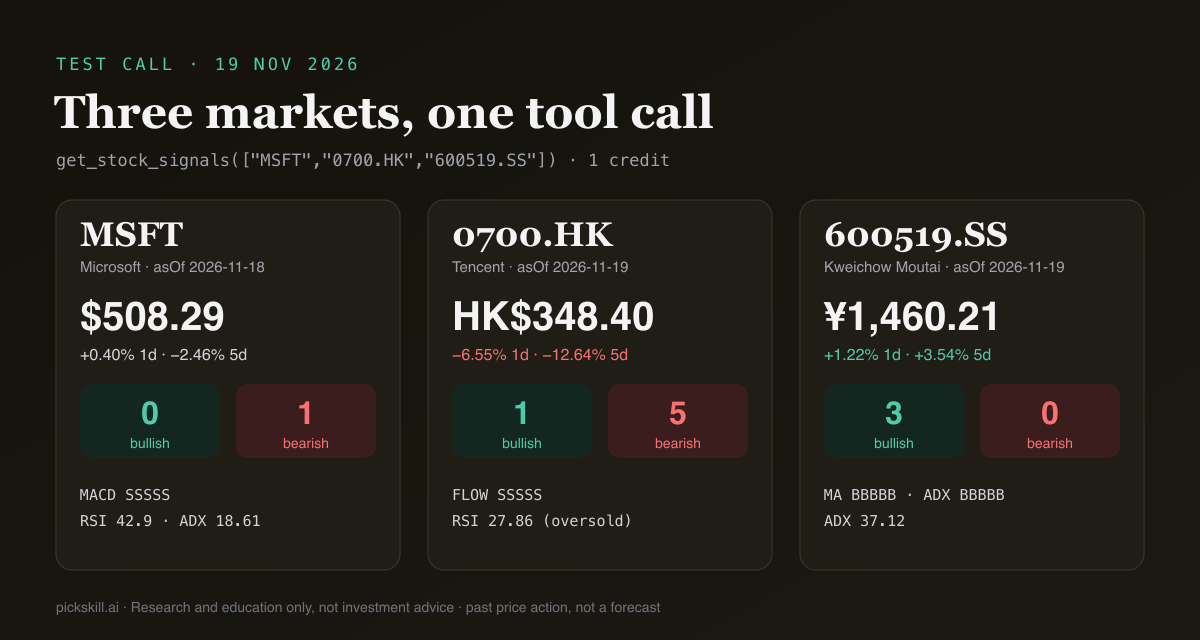
A successful first call returns, for each ticker, an asOf date, the latest close, the 1-day and 5-day change, and eight signal dimensions (MACD, moving averages, RSI, KDJ, Bollinger Bands, ADX, volume, money flow). Each dimension comes with a 5-day trail such as BBBBB and its raw values. We ran the test prompt above through PickSkill's MCP tools on 19 November 2026. Microsoft came back as of the 18 Nov US close at $508.29 with 0 bullish and 1 bearish dimension (MACD bearish five days running). Tencent (0700.HK) came back as of the 19 Nov Hong Kong close at HK$348.40, down 6.55% on the day, with 5 bearish dimensions and RSI at 27.86. Kweichow Moutai (600519.SS) showed ¥1,460.21 with 3 bullish and 0 bearish. Notice the different asOf dates. Each market closes at its own time, and the stamp is what tells the model how fresh its data is.
Which prompts trigger which tool, and what do they cost?
Each prompt below maps to one or two PickSkill tools. The model picks the tool from your wording, so naming PickSkill and the market helps. Credit costs come from PickSkill's published price list, and only successful calls are charged.
| Example prompt | Tool(s) called | Credits |
|---|---|---|
| "Get PickSkill signals for AAPL, MSFT, NVDA and 0700.HK. Which has the most bearish dimensions?" | get_stock_signals (up to 10 tickers per call) | 1 |
| "Check my PickSkill portfolios. Which holdings turned bearish this week?" | get_my_portfolio | 1 |
| "Did NVDA beat its EPS estimate last quarter? Summarise margins and valuation." | get_earnings_highlights | 2 |
| "Find S&P 500 stocks with RSI under 30." | screen_stocks | 3 |
| "Screen the Nasdaq-100 for a MACD golden cross in the last 5 days, then pull earnings for the top two." | screen_stocks + 2 × get_earnings_highlights | 7 |
Two limits are worth knowing. screen_stocks needs a paid PickSkill plan on top of credits; on Free it returns a "plan required" error and charges nothing. Earnings highlights are most complete for US-listed companies. The 100 free credits cover, for example, 100 signal calls (up to 1,000 ticker look-ups) or 33 screens. After that, packs cost $10 for 1,000 credits, $45 for 5,000 or $160 for 20,000, and credits don't expire. For screening logic itself, see How to Screen Stocks for a Golden Cross. For portfolio checks, see Track a Portfolio with Indicators.
What if the connection fails?
Most connection failures come down to one of four causes, and the error tells you which one. Tools appear but every call fails (HTTP 401): the key is missing, mistyped or revoked. In header fields, make sure the value reads Bearer psk_…, with the scheme and the space. "Not enough credits" (402): top up on your account page. Opening the URL in a browser shows a web page: that's expected. Browsers are sent to the setup page, and MCP clients POST JSON to the same URL. The client insists on SSE: PickSkill speaks Streamable HTTP only, so set the transport to http. In Claude Desktop, MCP logs live in ~/Library/Logs/Claude on macOS. Comparing MCP data sources before you commit? See our roundup of the best MCP servers for stock market data.
Everything here is for research and education only, not investment advice. Signals describe past price action and do not predict returns.
FAQ
Can Claude access real-time stock prices?
Not on its own. Claude's built-in knowledge stops at its training cutoff. Once you connect an MCP server such as PickSkill's, Claude can fetch the latest daily close, price changes and eight technical signals for US, Hong Kong and China A-share stocks, each stamped with an asOf date. The data is end-of-day, not tick-by-tick, which suits research rather than intraday trading.
Does ChatGPT support MCP servers?
Yes. ChatGPT on the web can add custom remote MCP servers, but as of November 2026 the dialog supports only OAuth, no authentication, or OAuth-or-no-auth. Servers that need a static API key, including PickSkill's, can't be authenticated there yet. OpenAI's Codex agent does support bearer tokens through bearer_token_env_var in config.toml.
Is the PickSkill MCP server free? Every account gets 100 free API credits. A signal check for up to 10 tickers costs 1 credit, a portfolio read 1, earnings highlights 2 and a screen 3. Screening also needs a paid plan. After the free credits, packs start at $10 for 1,000 credits. Credits don't expire, and failed calls are refunded.
Is it safe to give Claude my API key? A PickSkill API key is read-only. It can call the four MCP tools and the REST API, but it can't sign in, change your portfolios or see your chats, and you can revoke it at any time. Store it in an environment variable or the client's secure header field rather than in a shared project file.
What's the difference between the MCP server and the Data API?
They share the same four tools, the same key and the same credit balance. The MCP server is for AI agents such as Claude, which decide when to call a tool. The Data API is plain REST for your own scripts, notebooks and apps, with endpoints such as GET /signals and POST /screen.